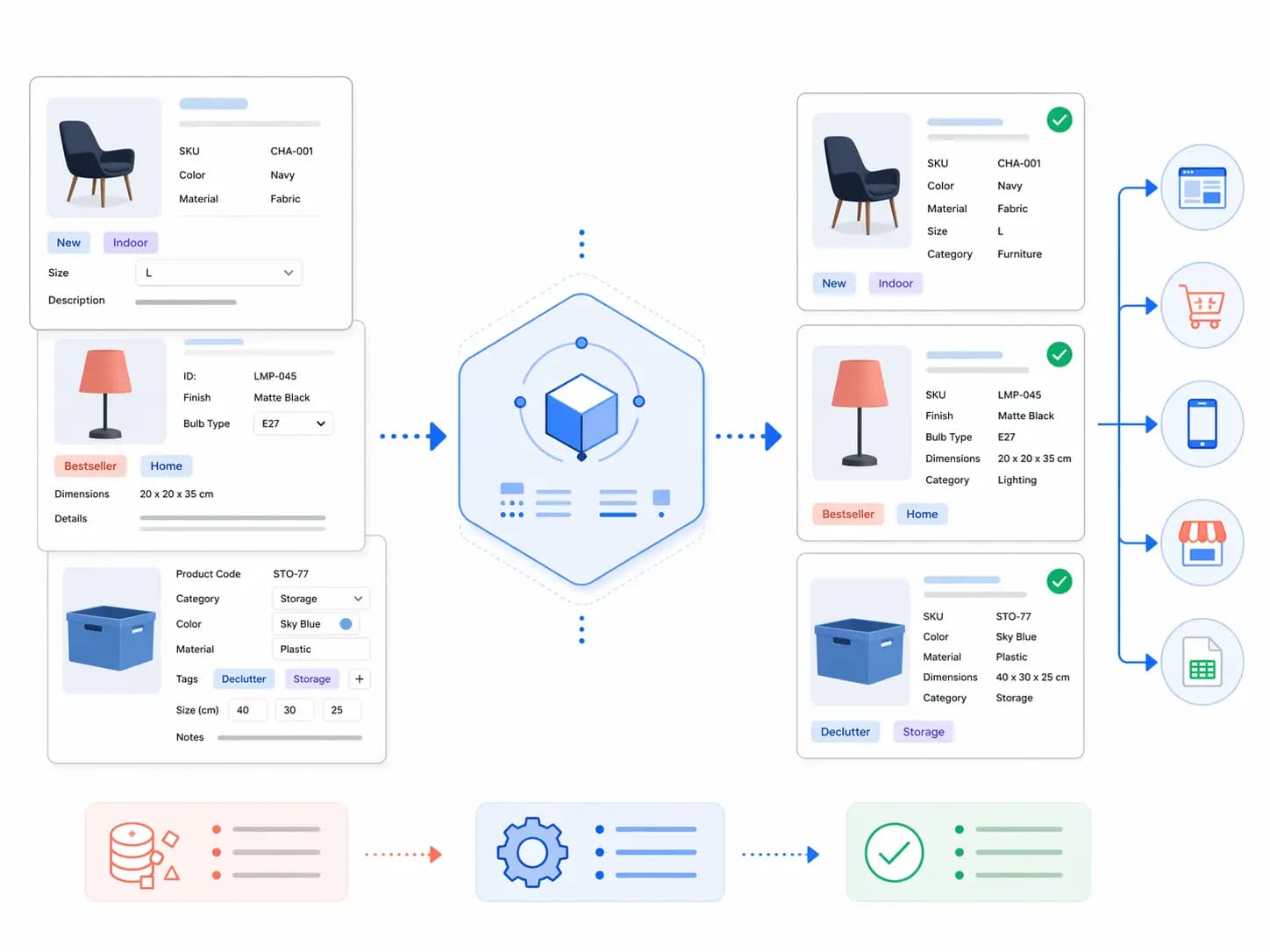
Les données produits fournisseurs sont l’une des principales raisons pour lesquelles les catalogues e-commerce deviennent désordonnés, incohérents et difficiles à faire évoluer.
TL;DR: Au départ, les fichiers fournisseurs peuvent sembler utiles. Ils font gagner du temps, apportent rapidement des détails produits et aident les équipes à combler des manques dans le catalogue.
Au départ, les fichiers fournisseurs peuvent sembler utiles. Ils font gagner du temps, apportent rapidement des détails produits et aident les équipes à combler des manques dans le catalogue. Mais dès que vous travaillez avec plusieurs fournisseurs, des formats différents, des noms incohérents, des attributs manquants, des doublons produits et une logique de variantes fragile, les données fournisseurs peuvent devenir discrètement l’une des plus grandes sources de problèmes catalogue.
Si votre équipe continue d’importer directement de mauvaises données fournisseurs dans le catalogue, cela finit par provoquer des filtres cassés, des fiches produits incohérentes, des erreurs de flux, des retards de lancement et beaucoup de nettoyage manuel.
Ce guide explique comment nettoyer les données produits fournisseurs avant qu’elles n’endommagent votre catalogue, avec un workflow pratique de normalisation, de mapping des attributs, de contrôles qualité et de gouvernance. Si vous ressentez déjà cette douleur sur plusieurs canaux et fournisseurs, c’est généralement le moment où une approche structurée de gestion de l’information produit devient nécessaire.
Pourquoi les données produits fournisseurs provoquent autant de problèmes catalogue
Les données fournisseurs reflètent généralement la manière dont le fournisseur organise ses produits, et non la manière dont votre entreprise doit gérer son catalogue.
Cela crée un décalage entre les fichiers fournisseurs entrants et votre modèle produit interne.
Les problèmes fréquents incluent :
- des noms de colonnes différents pour le même champ
- des unités et formats incohérents
- des titres trop longs, trop courts ou inutilisables
- des attributs techniques manquants
- des produits en doublon dans plusieurs flux fournisseurs
- des informations de variantes mélangées dans des lignes plates
- des matériaux, spécifications ou dimensions stockés dans les descriptions
- des images et documents avec des références de fichiers peu fiables
- des erreurs de taxonomie et de catégorisation
Si ces problèmes ne sont pas corrigés avant import, le catalogue commence à accumuler des erreurs plus vite que les équipes ne peuvent les corriger.
Ce que de mauvaises données fournisseurs cassent en aval
Les problèmes de données fournisseurs restent rarement confinés à un seul fichier. Ils se propagent généralement dans toute l’entreprise.
De mauvaises données fournisseurs provoquent souvent :
- des fiches produits incohérentes
- des filtres et facettes cassés
- des erreurs de flux marketplace
- des problèmes de format par canal
- des fiches en doublon
- des traductions manquantes
- une mauvaise gestion des variantes
- des lancements plus lents
- des corrections manuelles dans plusieurs équipes
C’est pourquoi le nettoyage des données fournisseurs n’est pas seulement une tâche d’achats. C’est une tâche centrale des opérations de données produits.
Étape 1 : arrêter d’importer directement les fichiers fournisseurs dans le catalogue maître
La première règle est simple : ne traitez pas les fichiers fournisseurs comme des données maîtres propres.
Les fichiers fournisseurs doivent d’abord passer par une couche de staging ou de revue, où votre équipe peut les valider et les normaliser avant qu’ils n’affectent le catalogue en production.
Cette étape intermédiaire permet de détecter :
- les champs obligatoires manquants
- les incohérences de format
- les produits en doublon
- les erreurs de taxonomie
- les problèmes de modèle de variantes
- les mauvaises références d’images ou de fichiers
Si les fichiers fournisseurs entrent directement dans le catalogue maître, le nettoyage devient beaucoup plus coûteux ensuite.
Étape 2 : construire un modèle standard de mapping des champs fournisseurs
Des fournisseurs différents n’utiliseront presque jamais les mêmes noms de champs. Vous avez donc besoin d’un modèle de mapping interne cohérent.
Par exemple, différents fournisseurs peuvent utiliser :
- Color / Couleur / Teinte / Finition
- Material / Matière / Composition / Matière principale
- Size / Dimensions / Taille produit / Taille emballage
- Description / Description longue / Texte marketing / Caractéristiques
Votre rôle consiste à mapper ces champs vers une structure d’attributs interne unique qui correspond à votre modèle catalogue.
C’est ici qu’une bonne gouvernance des attributs devient essentielle. Pour les bases, reliez cet article à Modélisation des données produit pour le PIM et Guide de taxonomie produit.
Étape 3 : normaliser les formats avant de commencer l’enrichissement
Avant que l’équipe ne commence à améliorer le contenu, normalisez d’abord les données brutes.
Cela inclut généralement la standardisation de :
- les unités de mesure
- les formats de date
- les règles de capitalisation
- les valeurs énumérées
- les champs booléens
- les références de noms de fichiers
- les identifiants produits
- les noms de marque et de fournisseur
Si la normalisation n’a pas lieu tôt, chaque étape d’enrichissement suivante devient incohérente.
Étape 4 : séparer les données fournisseurs brutes des données catalogue approuvées
Toute valeur fournie par un fournisseur ne doit pas devenir immédiatement une vérité produit.
Un workflow plus robuste sépare :
- les valeurs brutes soumises par le fournisseur
- les valeurs internes normalisées
- les valeurs catalogue relues et approuvées
Cela compte parce que certains champs fournisseurs peuvent être incomplets, trompeurs, dupliqués ou incohérents avec votre structure produit.
Si tout est traité comme approuvé dès l’arrivée, le catalogue maître devient très vite instable.
Étape 5 : corriger séparément les titres, descriptions et spécifications
Une erreur fréquente consiste à essayer de nettoyer tout le contenu fournisseur entrant en une seule passe.
Il est généralement préférable de traiter séparément :
- Les titres — ils doivent suivre votre logique de nommage, pas le format aléatoire du fournisseur
- Les descriptions — elles doivent être réécrites ou structurées selon les besoins de vos canaux
- Les spécifications — elles doivent être extraites dans des attributs structurés dès que possible
C’est particulièrement important lorsque les fournisseurs placent des détails techniques dans de longues descriptions au lieu d’utiliser des champs structurés.
Étape 6 : nettoyer la taxonomie et les catégories très tôt
Les catégories fournisseurs correspondent rarement exactement à votre taxonomie interne.
Si le mapping des catégories est faible, vous obtenez des problèmes comme :
- des produits dans les mauvais chemins de navigation
- des filtres qui ne fonctionnent pas correctement
- des attributs obligatoires incohérents
- un merchandising et des résultats de recherche dégradés
Cela signifie que le nettoyage des catégories doit se faire dès le début du workflow, pas après le début de la publication du contenu.
Cet article doit aussi relier vos contenus sur la taxonomie, car qualité taxonomique et nettoyage fournisseur sont étroitement liés.
Étape 7 : traiter les variantes comme un problème de modèle produit, pas de tableur
Les fichiers fournisseurs aplatissent souvent les variantes dans des lignes désordonnées. Mais votre catalogue doit comprendre correctement la structure parent-enfant ou famille-variante.
Cela signifie décider :
- quels champs appartiennent au niveau parent
- quels champs appartiennent au niveau variante
- quelles images s’appliquent à toutes les variantes ou à certaines seulement
- quelles dimensions ou matières changent selon la variante
Si la logique de variante n’est pas nettoyée avant l’import, le catalogue finit généralement avec des doublons, des filtres cassés et des sorties canal confuses.
Étape 8 : ajouter des règles qualité avant que les données n’avancent
Un bon workflow de nettoyage fournisseur a besoin de garde-fous qualité.
Exemples de contrôles utiles :
- présence des attributs obligatoires
- signalement des valeurs invalides
- identification des SKU en doublon
- validation des relations de variantes
- confirmation du mapping des catégories
- vérification des titres selon les règles internes
- liaison correcte des images et documents
Sans contrôles qualité, le nettoyage devient subjectif et incohérent selon les personnes de l’équipe.
Étape 9 : mesurer où les données fournisseurs sont les plus faibles
Tous les problèmes de données fournisseurs n’ont pas le même poids. Quelques fournisseurs, catégories ou familles produits créent souvent l’essentiel de la douleur.
Suivez des indicateurs comme :
- fréquence des champs manquants
- fréquence des doublons produits
- fréquence des erreurs de taxonomie
- fréquence des erreurs de modèle de variantes
- écarts de qualité sur les documents et images
- scores de complétude par fournisseur
Cela aide votre équipe à se concentrer sur les pires sources de problèmes au lieu de traiter tous les flux fournisseurs de la même manière.
Étape 10 : améliorer le workflow fournisseur, pas seulement le fichier
Si le nettoyage fournisseur est douloureux à chaque fois, le problème n’est généralement pas seulement la donnée. C’est le workflow d’entrée.
Un meilleur processus long terme inclut généralement :
- des templates fournisseurs standardisés
- des règles claires sur les champs obligatoires
- des exemples de format
- un processus de dépôt ou soumission contrôlé
- des boucles de retour pour les soumissions rejetées ou incomplètes
- un suivi qualité par fournisseur
C’est à ce moment que le nettoyage des données fournisseurs passe d’une lutte permanente à une opération de données produits beaucoup plus contrôlée.
Checklist pratique de nettoyage des données fournisseurs
- Les fichiers fournisseurs sont-ils revus avant d’entrer dans le catalogue principal ?
- Mappions-nous les champs fournisseurs vers un modèle interne unique d’attributs ?
- Les formats et unités sont-ils normalisés de manière cohérente ?
- Séparons-nous les valeurs fournisseurs brutes des valeurs catalogue approuvées ?
- Les titres, descriptions et spécifications sont-ils nettoyés différemment ?
- Le mapping des catégories est-il contrôlé ?
- La logique de variantes est-elle correctement modélisée ?
- Utilisons-nous des contrôles qualité avant l’import ?
- Pouvons-nous mesurer quels fournisseurs provoquent le plus de problèmes ?
- Améliorons-nous le workflow fournisseur, et pas seulement les fichiers manuellement ?
Si plusieurs de ces points sont encore faibles, les données fournisseurs abîment probablement votre catalogue plus que votre équipe ne le pense.
Comment LynkPIM aide à nettoyer les données produits fournisseurs
LynkPIM aide les équipes à nettoyer les données produits fournisseurs en leur donnant une manière plus structurée d’organiser les attributs, de normaliser les valeurs entrantes, de séparer les données soumises par le fournisseur des données catalogue approuvées, de gérer la complétude et de préparer des fiches produits plus propres pour les canaux et les marchés.
Cela rend le nettoyage fournisseur plus opérationnel et moins dépendant d’un firefighting permanent dans des tableurs.
Pour relier cet article au cluster plus large de LynkPIM, liez-le à Ce que signifie vraiment une source unique de vérité dans les opérations produit, Checklist qualité des données produit, et à la page fonctionnalité Product Information Management.
Réflexion finale
Les données produits fournisseurs deviennent dangereuses lorsque les équipes les traitent comme une vérité catalogue propre, sans structure, sans normalisation et sans contrôle qualité.
Si vous nettoyez les données fournisseurs avant qu’elles n’atteignent le catalogue maître, vous protégez en même temps la taxonomie, les variantes, la cohérence multicanale et la vitesse de lancement.
C’est l’une des corrections à plus fort levier qu’une équipe e-commerce en charge des données produit puisse mettre en place.
FAQ
Pourquoi les données produits fournisseurs sont-elles souvent si désordonnées ?
Les données fournisseurs sont généralement structurées pour les systèmes du fournisseur, pas pour votre modèle catalogue interne. Cela entraîne des champs incohérents, une mauvaise gestion des variantes, des erreurs de catégories et des attributs manquants.
Les fichiers fournisseurs doivent-ils aller directement dans le catalogue principal ?
Non. Un meilleur processus utilise d’abord une couche de staging ou de revue afin de normaliser les formats, valider les attributs, détecter les doublons et corriger les problèmes de taxonomie ou de variantes avant que les données ne deviennent la vérité catalogue.
Quelle est la première étape pour nettoyer les données produits fournisseurs ?
La première étape consiste à arrêter de traiter les fichiers fournisseurs comme des données maîtres et à créer un processus d’entrée structuré avec mapping, normalisation et contrôles qualité avant import.
Comment empêcher les données fournisseurs de casser les variantes et les filtres ?
Nettoyez tôt le mapping des catégories, définissez correctement la logique parent-enfant des variantes, normalisez les valeurs d’attributs et validez les champs obligatoires avant que les données n’atteignent le catalogue live.
Pourquoi le nettoyage des données fournisseurs est-il important pour l’e-commerce multicanal ?
Parce que de mauvaises données fournisseurs se propagent sur Shopify, les marketplaces, les flux, les catalogues et le contenu localisé. Les corriger tôt évite les doublons, les incohérences et les retards de lancement.
À partir de quand une entreprise a-t-elle généralement besoin d’un PIM pour nettoyer les données fournisseurs ?
Généralement lorsque les fichiers fournisseurs viennent de plusieurs sources, que la logique d’attributs devient complexe, que les variantes sont difficiles à gérer et que le nettoyage manuel dans des tableurs ne passe plus à l’échelle.

By Binu Mathew
CEO @ itmarkerz technologiesBinu Mathew is the CEO of itmarkerz technologies and founder of LynkPIM — a modern product information management platform built for growing e-commerce brands. He has spent years working at the intersection of product data, digital commerce, and catalog operations, helping teams eliminate data silos, enforce quality standards, and publish accurate product content at scale. His work spans PIM strategy, marketplace syndication, and Digital Product Passport compliance.
Use These PIM Tools Next
- Use the PIM Readiness Assessment to Benchmark Your Team
- Check Catalog Health Score Before Expanding Channels
- Audit Required Product Fields with the Completeness Checker
- Validate GTIN, UPC, and EAN Codes Before Publishing
- Assess Team Capability Gaps Before Process Changes
- Evaluate Data Governance Maturity for Scaled Catalog Operations
Build Your Product Data Roadmap
Move from theory to execution with free tools and a practical PIM implementation path.