How to Automate Your Google Shopping Feed Updates (2026 Guide)
Manual Google Shopping feed management is one of the highest-risk activities in ecommerce operations. Every time a price changes, a product goes out of stock, or a promotion goes live — and the feed is not updated within 24 hours — you risk price mismatch disapprovals that remove products from Shopping entirely. Full automation eliminates this risk.
This guide covers every automation method available in 2026, when to use each, and how to set them up correctly.
Why Manual Feed Updates Fail
Manual feed management fails not because teams are careless but because the speed of change in ecommerce catalogs outpaces human update cycles. Prices change for flash sales. Stock depletes. New products launch. Promotions end. Any one of these events — if not reflected in the feed within 24 hours — creates a price mismatch or availability mismatch that Merchant Center catches during its next crawl.
The solution is not faster manual processes. It is removing humans from the update loop entirely for routine data changes. For the context on how feeds connect to your product data source, see the PIM to Google Shopping Integration guide .
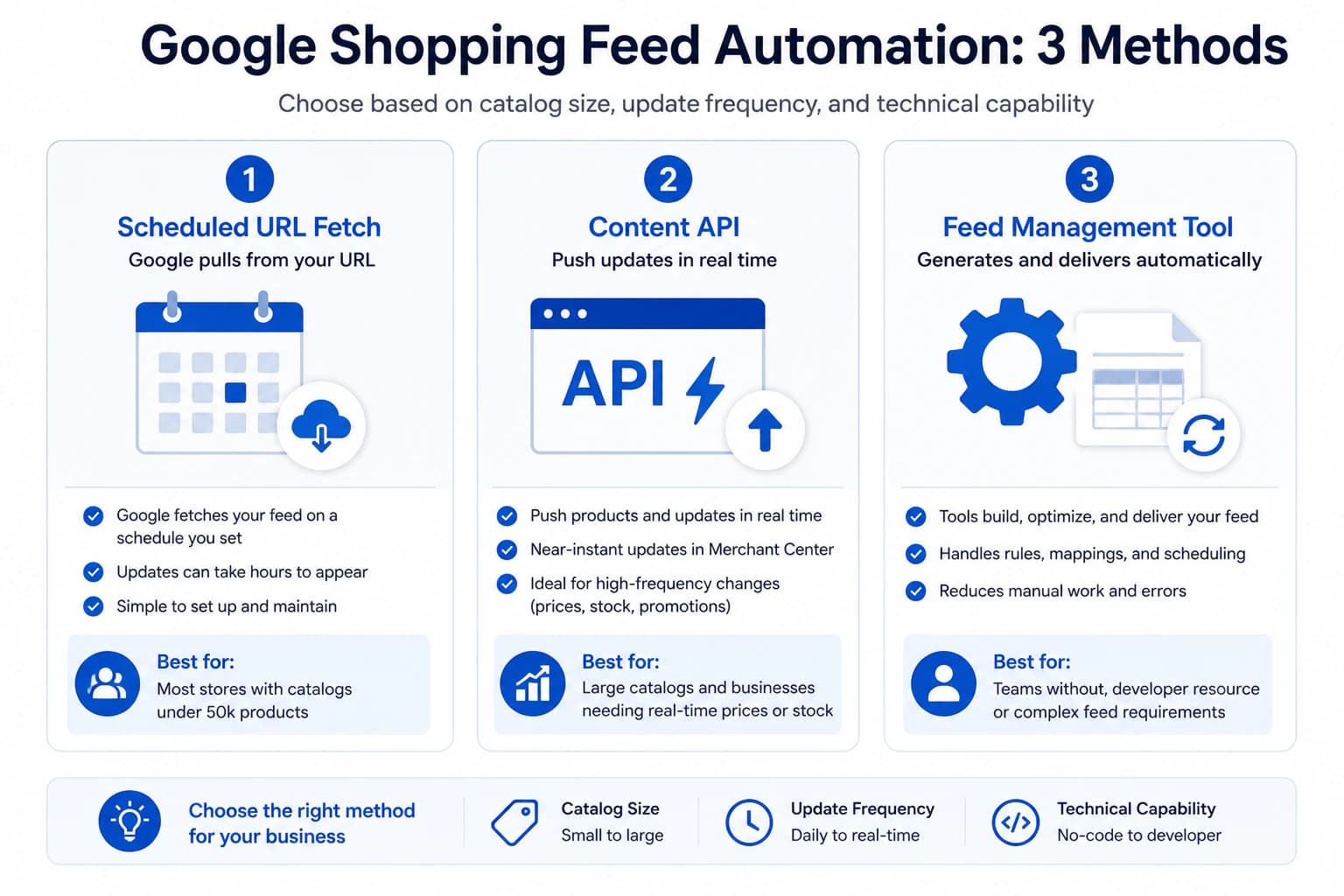
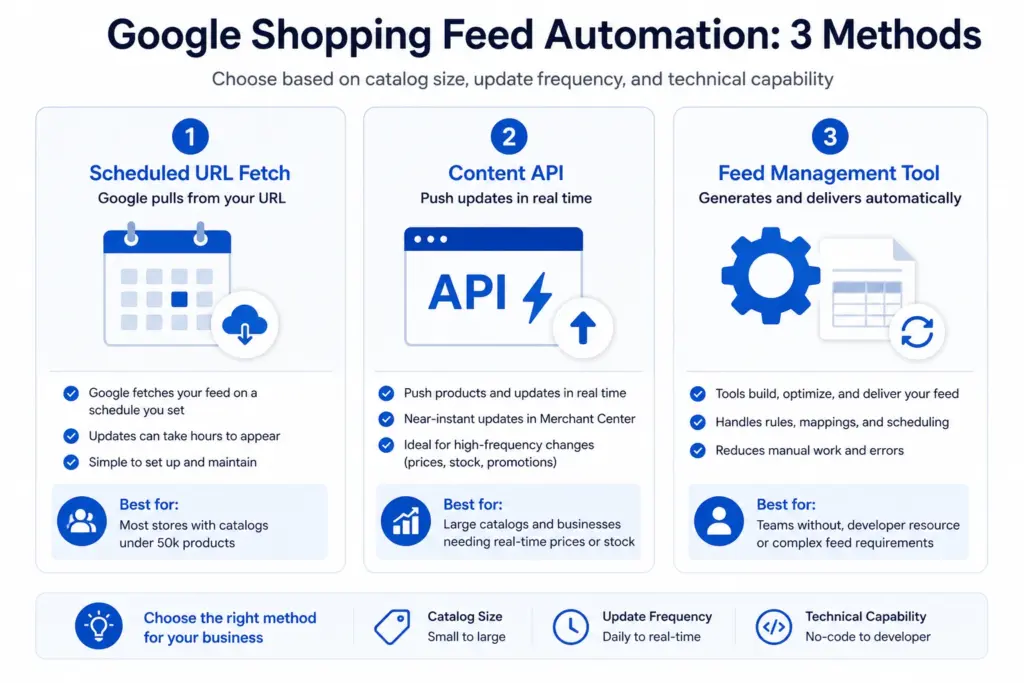
Method 1: Scheduled URL Fetch (Recommended for Most Stores)
Your system generates a feed file at a stable URL. Google Merchant Center fetches that URL on a schedule you configure — daily, twice daily, or more frequently. Every fetch pulls a fresh copy of your full product data.
How to set it up
- In Merchant Center, go to Products → Feeds → [your primary feed] → Settings
- Under Fetch Schedule, set the frequency to Daily at minimum
- Set the fetch time to a low-traffic period — typically 2:00–4:00 AM in your primary market timezone
- For stores with frequent promotions or high stock turnover, set to Twice daily
- Save and trigger a manual fetch to confirm the URL is accessible and the feed processes without errors
Best for: Most ecommerce stores. Works with any platform that can generate a feed file at a stable URL — Shopify, WooCommerce, Magento, custom platforms.
Limitation: The whole feed updates at once on a schedule. If a product goes out of stock at 10am and your next fetch is at 2am, the product will show as in stock in Shopping for 16 hours. For stores with fast-moving inventory, this window creates availability mismatch risk.
Method 2: Google Content API (Real-Time Updates)
The Content API allows your system to push product updates to Merchant Center immediately when a product changes — no waiting for a scheduled fetch. A price change in your platform can trigger an API call that updates the product in Merchant Center within minutes.
When to use the Content API
- Catalogs over 50,000 products where full-feed fetches become slow or resource-heavy
- Stores with real-time pricing (dynamic pricing, live stock-based pricing)
- High-velocity inventory where products sell out within hours
- Stores running multiple daily promotions that change prices frequently
Content API setup requirements
The Content API requires developer resource to implement — it is not a no-code option. Your platform needs to be configured to send API calls to Merchant Center when product data changes. Google’s Content API documentation is the reference for implementation. The Feed Generator handles API delivery without custom development for most store configurations.
Method 3: Feed Management Tool (No-Code Automation)
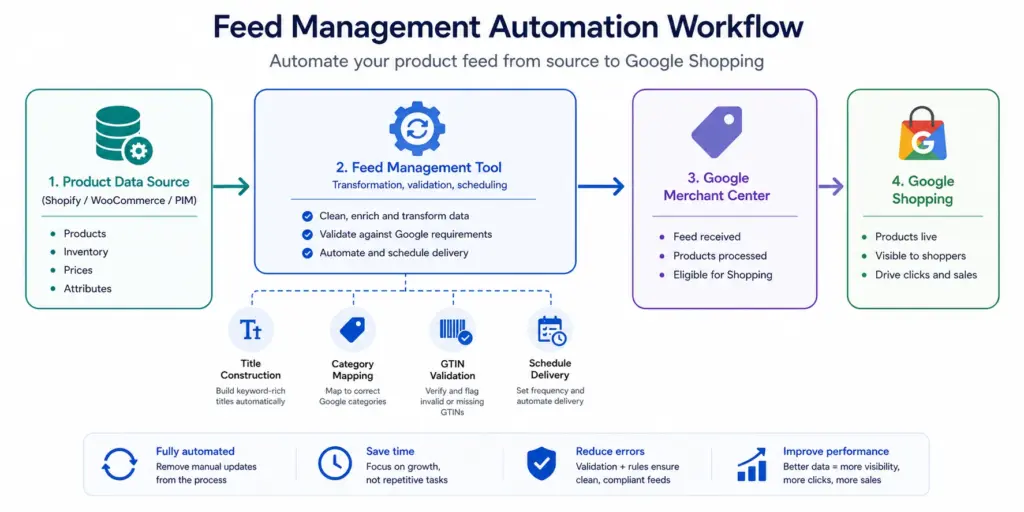
Feed management tools sit between your product data source and Merchant Center. They pull product data from your platform or PIM, apply transformation rules (title construction, category mapping, attribute normalisation), generate the feed file, and deliver it to Merchant Center on schedule — with no manual steps after initial setup.
Best for: Teams without developer resource, stores managing feeds across multiple channels (Google + Amazon + Facebook), and catalogs where feed transformation logic is complex enough that maintaining it manually is impractical.
Separating Price/Availability from Content Updates
Not all feed data needs to update at the same frequency. Treating your feed as a single monolithic file that updates everything at once is inefficient and sometimes counterproductive.
| Data Type | Update Frequency | Delivery Method |
|---|---|---|
| Price, sale_price, availability | Daily minimum — twice daily for promotions | Primary feed or price-only supplemental feed |
| New products | Same day as launch | Supplemental feed or Content API push |
| Titles, descriptions | Weekly | Primary feed |
| Images | On change | Primary feed |
| Custom labels | Weekly or monthly | Custom label supplemental feed |
Using a supplemental feed for price and availability updates is a practical option for stores whose primary feed platform cannot be updated on a daily schedule. See the Supplemental Feeds guide for setup details.
Setting Up Merchant Center Alerts
Automation without monitoring is incomplete. Feed automation can fail — URLs become inaccessible, file formats break, authentication tokens expire. Set up Merchant Center email alerts so processing failures are caught within hours, not days.
- In Merchant Center, go to Settings → Email Preferences
- Enable alerts for: Feed processing errors, Product disapprovals (daily digest), Account warnings
- Add a shared team email address (not just a personal one) so alerts are seen even when you are out of office
For full automation of feed generation, delivery, and monitoring from one place — including price validation before submission — the Google Shopping Feed Generator handles all three without custom development. Start with the LynkPIM free plan .
Frequently Asked Questions
How often should Google Shopping feeds update?
Price and availability fields should update at minimum daily. Stores with frequent promotions or fast-moving inventory should update twice daily. Product content fields (titles, descriptions, images) can update weekly — these change infrequently and do not cause disapprovals if slightly delayed. The critical rule: your feed price must match your landing page price at all times.
What is the difference between Scheduled URL Fetch and the Content API?
Scheduled URL Fetch pulls a complete feed file from a hosted URL on a schedule — best for catalogs under 50,000 products with predictable update patterns. The Content API allows your system to push individual product updates to Merchant Center in real time as products change — better for large catalogs, real-time prices, or stores with unpredictable inventory movements.
What happens if my Google Shopping feed fails to update?
If your feed fails to fetch for more than 30 days, Google may deactivate it and your products stop appearing in Shopping. Shorter delays cause price mismatch disapprovals when your site prices change but your feed does not update. Set up Merchant Center email alerts for feed processing errors so failures are caught within hours, not days.

By Binu Mathew
CEO @ itmarkerz technologiesBinu Mathew is the CEO of itmarkerz technologies and founder of LynkPIM — a modern product information management platform built for growing e-commerce brands. He has spent years working at the intersection of product data, digital commerce, and catalog operations, helping teams eliminate data silos, enforce quality standards, and publish accurate product content at scale. His work spans PIM strategy, marketplace syndication, and Digital Product Passport compliance.
Use These PIM Tools Next
- Use the PIM Readiness Assessment to Benchmark Your Team
- Check Catalog Health Score Before Expanding Channels
- Audit Required Product Fields with the Completeness Checker
- Validate GTIN, UPC, and EAN Codes Before Publishing
- Assess Team Capability Gaps Before Process Changes
- Evaluate Data Governance Maturity for Scaled Catalog Operations
Build Your Product Data Roadmap
Move from theory to execution with free tools and a practical PIM implementation path.