How Bad Product Taxonomy Kills Your Site Search (and What to Fix First)
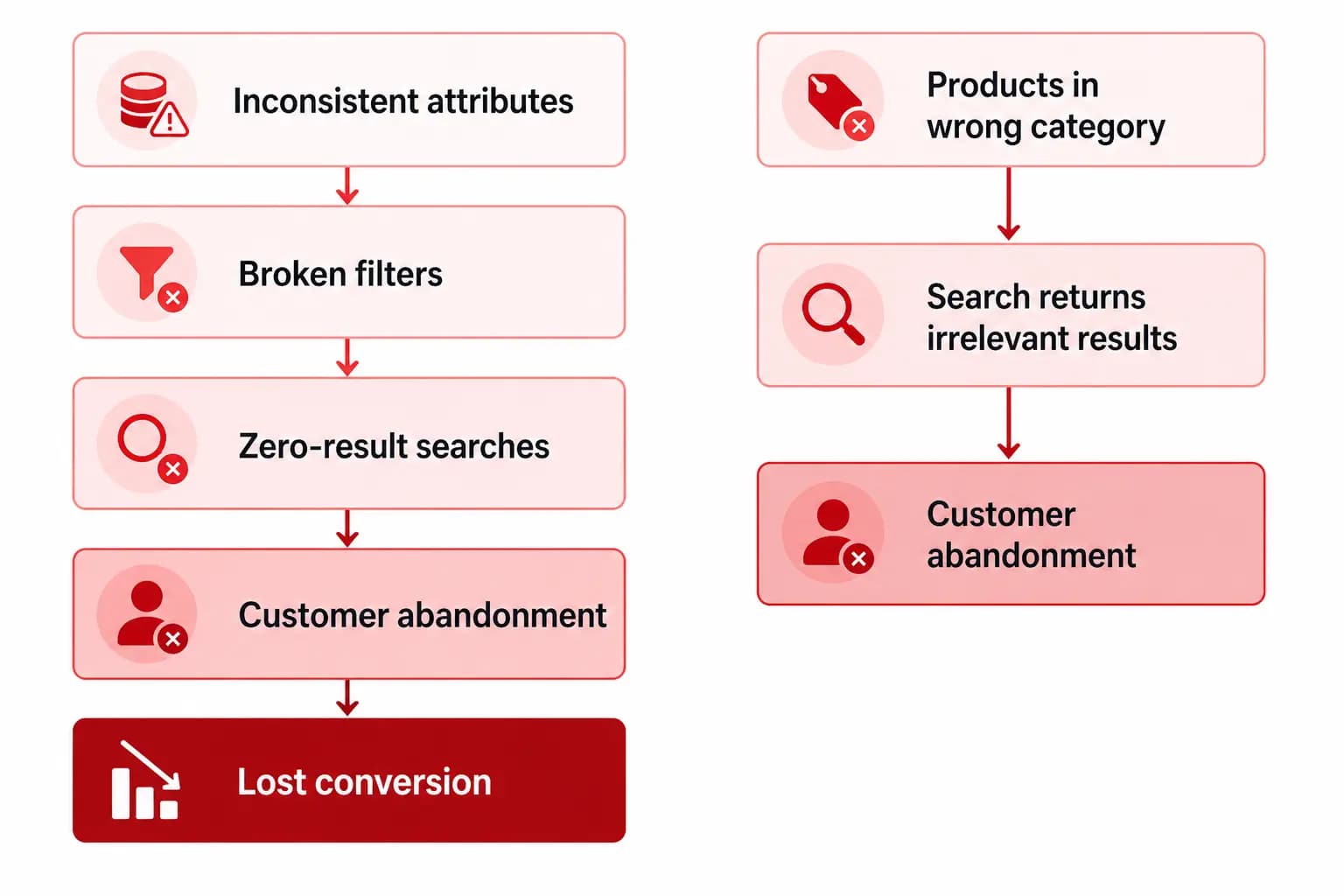
Site search is where buyers with high purchase intent go. A customer using your site search already knows they want something — they are not browsing, they are trying to buy. When that search fails, returns irrelevant results, or shows broken filters, that customer is gone. And bad product taxonomy is the reason it fails more often than any other factor.
This article covers the exact ways taxonomy problems break site search, how to identify which ones are costing you the most, and what to fix first for the fastest conversion impact.
The 5 Ways Bad Taxonomy Destroys Site Search
1. Zero-result searches for products that exist
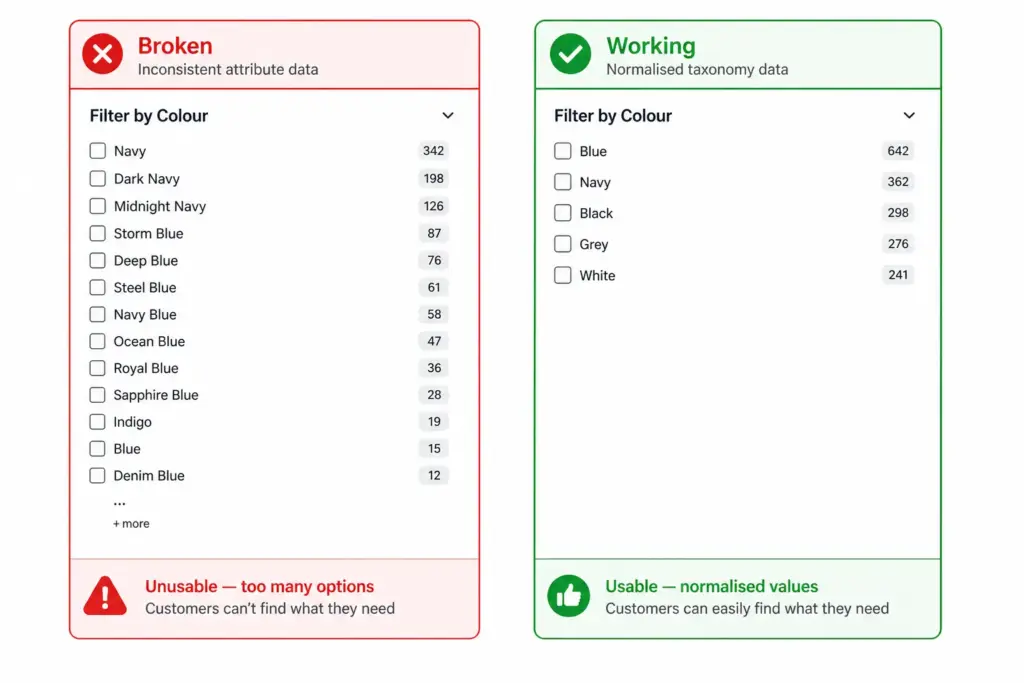
A customer searches for “navy waterproof jacket”. You have three of them in stock. But they do not appear in the results because the colour attribute is stored as “Storm Blue” in one product and “Dark Navy” in another — neither matches “navy”. The filter engine cannot retrieve products it cannot match.
This is the most costly taxonomy failure because it is invisible. Your product catalog tells you nothing is wrong. Your search results tell the customer nothing exists. They leave and buy elsewhere.
2. Broken filters from inconsistent attribute values
Filters are only as good as the consistency of the attribute data they draw from. If your colour attribute has values like “Navy”, “Dark Navy”, “Midnight Navy”, “Navy Blue”, “Storm Blue”, “Deep Blue”, and “Steel Blue” — your colour filter becomes a list of 40+ options that customers cannot navigate. They give up on filtering and resort to keyword search, which then fails for the reason above.
The same problem affects size (S, Small, SM, Sm, size S), material (Cotton, 100% Cotton, Pure Cotton, Cotton Rich), and almost every attribute that is entered manually without controlled values.
3. Wrong products in search results
A product placed in the wrong category surfaces in the wrong filter context. A customer filtering “Women’s Shoes” should not see men’s boots that were miscategorised. This damages trust immediately — if your search returns obviously wrong products, customers lose confidence in the entire catalog.
4. Missing attributes creating empty filter panels
If 30% of your sofa products are missing the “Number of Seats” attribute, your seating filter only covers 70% of your sofas. A customer filtering for 3-seater sofas gets an incomplete result set and may conclude you do not stock what they need — when you do, it is just missing the attribute that would surface it.
5. Flat taxonomy making all filters identical
A flat taxonomy with no subcategories means all products in a top-level category share the same filter panel. A home goods store with a flat structure shows size, colour, and material filters for sofas, ceiling lights, and kitchen knives simultaneously — none of the filters are relevant to all products, so none of them are useful to anyone.
Hierarchical taxonomy enables category-specific filter sets — sofas show Number of Seats, Fabric, and Configuration; lighting shows Fitting Type, Bulb Included, and Dimmable. The difference in filter usability is dramatic. See Flat vs Hierarchical Taxonomy for when each applies.
How to Find Which Taxonomy Problems Are Hurting You Most
Before fixing anything, identify where the problem is largest. Three data sources tell you this:
1. Site search zero-results report
Extract your zero-result search queries from your analytics platform. Every query that returned zero results is a potential taxonomy failure. Match these queries against your product catalog — if the product exists but did not surface, the cause is almost always a missing or inconsistent attribute value.
2. High-exit filter paths
Look at which filter combinations have the highest bounce or exit rates. If customers who filter by “Blue” then immediately leave, the blue filter results are irrelevant or incomplete. This points to a colour normalisation problem.
3. Attribute completeness audit
Run an attribute completeness check across every subcategory. What percentage of products in each subcategory have the Size attribute? The Colour attribute? The Material attribute? Any subcategory below 80% completeness on its required attributes has broken filters. Use the Completeness Checker to run this across your full catalog.
What to Fix First — Priority Order
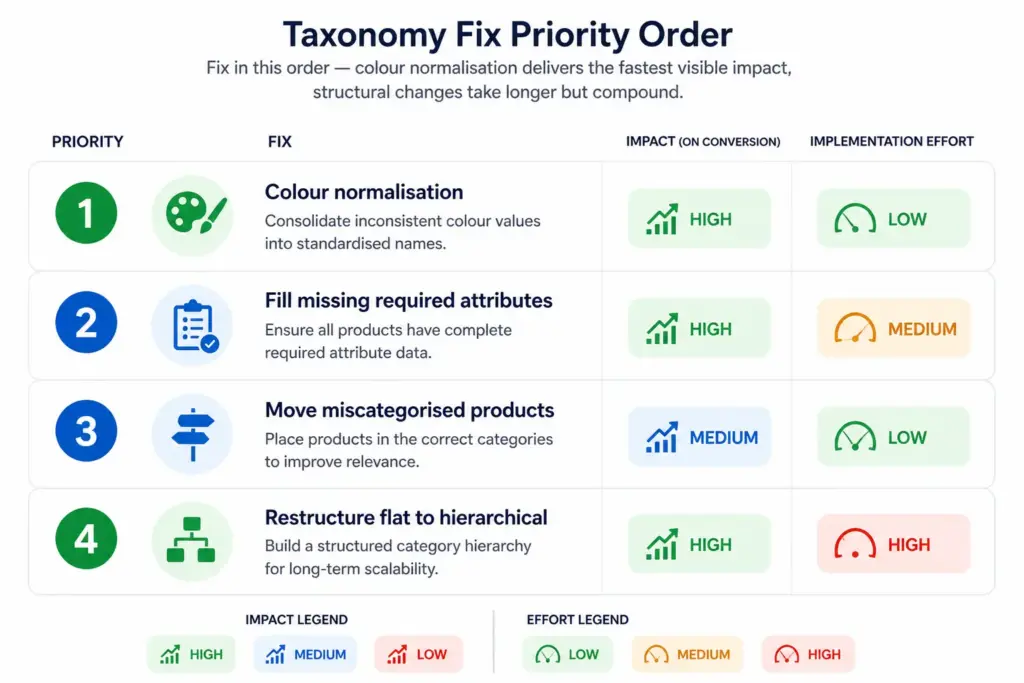
- Colour normalisation (fastest impact, lowest effort) — create a controlled colour value list (Blue, Red, Green, Black, White, Grey, Yellow, Pink, Purple, Brown, Orange, Beige) and remap all existing colour values to it. This immediately fixes colour filters across all affected products.
- Fill missing required attributes (high impact, medium effort) — identify which attributes are missing at scale using your completeness checker, then bulk-fill them. Start with the subcategories that have the most products and the lowest completeness scores.
- Reclassify miscategorised products (medium impact, low effort per product) — use your zero-results report to identify which searches are failing and cross-reference against product records to find miscategorised items. Fix them in batches by subcategory.
- Restructure flat to hierarchical (highest long-term impact, highest effort) — this is the right fix if your underlying structure is flat. It takes longer but compounds — every future product benefits from the correct structure without manual intervention. See How to Build a Product Taxonomy From Scratch for the build process.
The PIM Readiness Score identifies exactly where your current taxonomy and attribute data governance has gaps — and gives you a prioritised action list to work from. Free, takes 5 minutes. Start there before deciding which of the four fixes to tackle first.
Frequently Asked Questions
How does bad product taxonomy affect site search?
Bad taxonomy causes zero-result searches (products exist but are miscategorised or missing attributes), broken filters (attributes not consistently assigned), and irrelevant search results (products from wrong categories surface). Customers see these as a broken site — they do not know the cause is data quality.
What is the fastest taxonomy fix for improving site search conversion?
Colour normalisation delivers the fastest visible impact. If your colour attribute has 40+ inconsistent values instead of a controlled list of 8–12 normalised values, your colour filter is broken for every customer who uses it. Normalising to a controlled list immediately fixes colour-based filtering across all affected products without changing your catalog structure.
How do I find which taxonomy problems are hurting my site search most?
Extract your zero-result search queries from your analytics platform — every query that returned nothing for a product that exists is a taxonomy failure. Cross-reference against your product catalog to identify the specific attribute gaps. Also run an attribute completeness audit by subcategory to find where required attributes are most frequently missing.
Can site search work well with a flat taxonomy?
Only for very small catalogs under ~200 products. Once the catalog grows, a flat taxonomy forces all products in a top-level category to share the same filter panel regardless of product type — making filters irrelevant and unusable. Customers abandon filtered search and rely on keyword search, which then fails due to inconsistent attribute values.

By Binu Mathew
CEO @ itmarkerz technologiesBinu Mathew is the CEO of itmarkerz technologies and founder of LynkPIM — a modern product information management platform built for growing e-commerce brands. He has spent years working at the intersection of product data, digital commerce, and catalog operations, helping teams eliminate data silos, enforce quality standards, and publish accurate product content at scale. His work spans PIM strategy, marketplace syndication, and Digital Product Passport compliance.
Use These PIM Tools Next
- Use the PIM Readiness Assessment to Benchmark Your Team
- Check Catalog Health Score Before Expanding Channels
- Audit Required Product Fields with the Completeness Checker
- Validate GTIN, UPC, and EAN Codes Before Publishing
- Assess Team Capability Gaps Before Process Changes
- Evaluate Data Governance Maturity for Scaled Catalog Operations
Build Your Product Data Roadmap
Move from theory to execution with free tools and a practical PIM implementation path.