Product Attributes in Ecommerce: How to Create Filters That Help Customers Buy
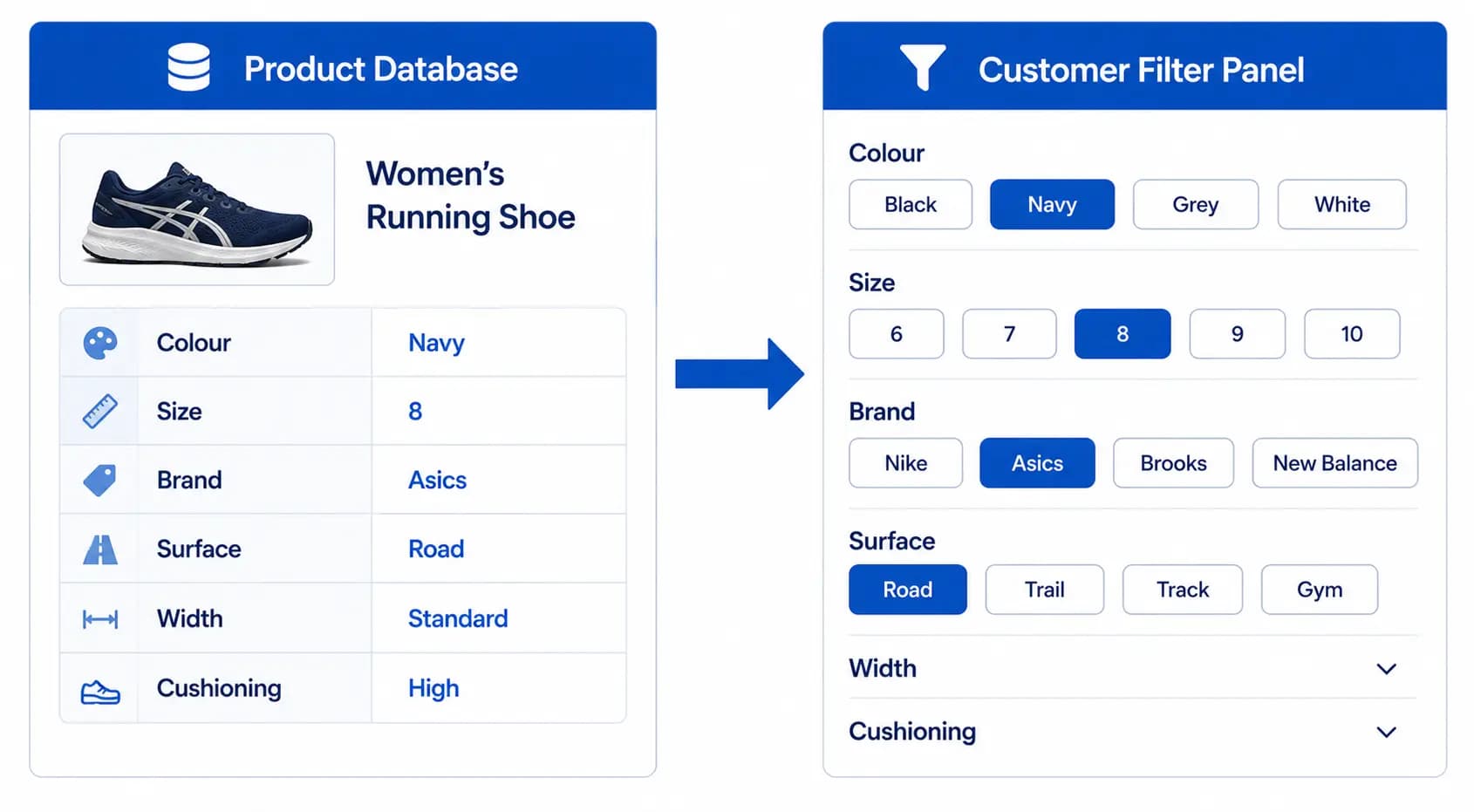
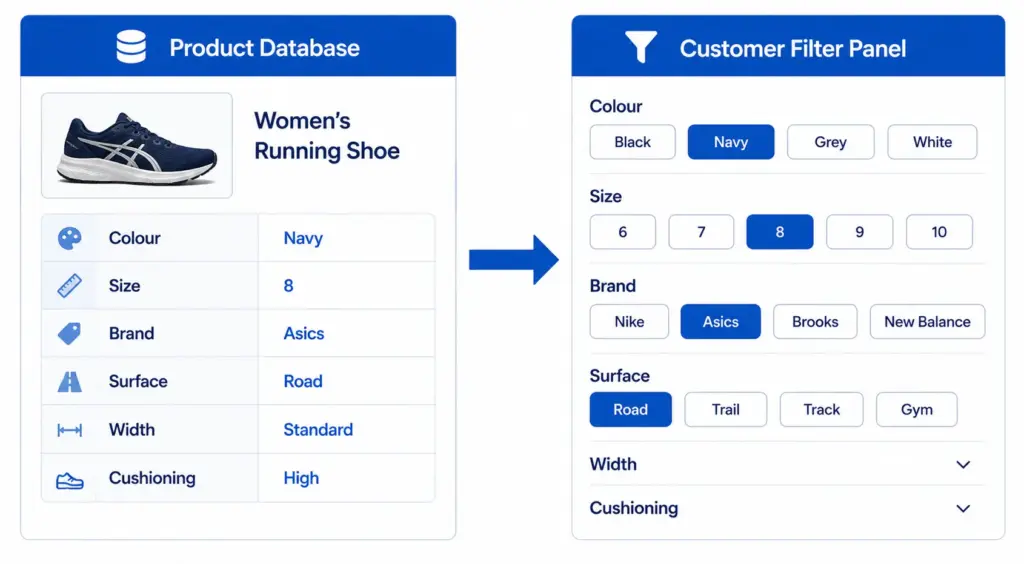
Product attributes are the structured properties that describe what a product is and how it differs from other products — Colour, Size, Material, Brand, Processor Speed, Number of Seats, Waterproof Rating. They are the data layer that powers your site filters, your search matching, your channel feeds, and your product comparison functionality. Get them right and customers find what they need. Get them wrong and filters return empty results, searches miss matching products, and Google Shopping underperforms.
Types of Product Attributes
Universal attributes
Attributes that apply to virtually every product regardless of category: Brand, Price, Colour, Material, Weight, Dimensions. These are the foundation of most filter systems and are required for channel feeds like Google Shopping.
Category-specific attributes
Attributes that only apply within a specific category or subcategory. Size and Size System for apparel and footwear. Processor and RAM for laptops. Number of Seats and Configuration for sofas. IP Rating and Fitting Type for lighting. These are defined in your taxonomy’s attribute set for each subcategory — they do not appear in the filter panel for irrelevant categories.
Technical specification attributes
Precise technical values with units: Screen Size (inches), Storage Capacity (GB), Battery Life (hours), Waterproof Rating (IP rating), Thread Standard (M6, M8), Tensile Strength (MPa). These are the primary purchase decision attributes for high-consideration products like electronics and industrial components. See the Electronics Taxonomy guide for the full attribute sets required per subcategory.
Compliance and certification attributes
Required for regulated products: CE Marking, ATEX certification, RoHS compliance, allergen declarations for food, organic certification for food and textiles. These are not typically filterable but are mandatory product data in the relevant categories.
Required vs Optional Attributes — The Practical Distinction
The traditional distinction between required and optional attributes needs a practical reframe for ecommerce. The question is not “can we publish this product without this attribute?” — technically many attributes are not hard-blocked. The question is “does missing this attribute cost us customers?”
| Attribute | Formal Status | Practical Impact If Missing |
|---|---|---|
| Colour (fashion) | Required for Google Shopping variants | Product invisible in colour filters, wrong image may show |
| Size (fashion) | Required for Google Shopping variants | Product invisible in size filters |
| Occasion (fashion) | Optional | Product invisible in “Occasion = Formal” filter searches — often high-intent |
| Battery Life (laptops) | Optional | Invisible to buyers filtering by battery life — significant buyer segment |
| Number of Seats (sofas) | Optional | Invisible in “3-seater” filter searches — primary buyer decision point |
Any attribute that drives significant filter usage should be treated as effectively required, regardless of its formal status. Run your site search and filter analytics to identify which attributes buyers filter by most — those are your de facto required attributes.
Controlled Vocabularies — The Foundation of Working Filters
A controlled vocabulary is a defined list of acceptable values for an attribute. Without controlled vocabularies, teams enter attribute values manually and inconsistency accumulates — “Navy”, “Dark Navy”, “Midnight Blue”, “Storm Blue”, “Deep Blue” all represent the same colour but appear as separate filter options.
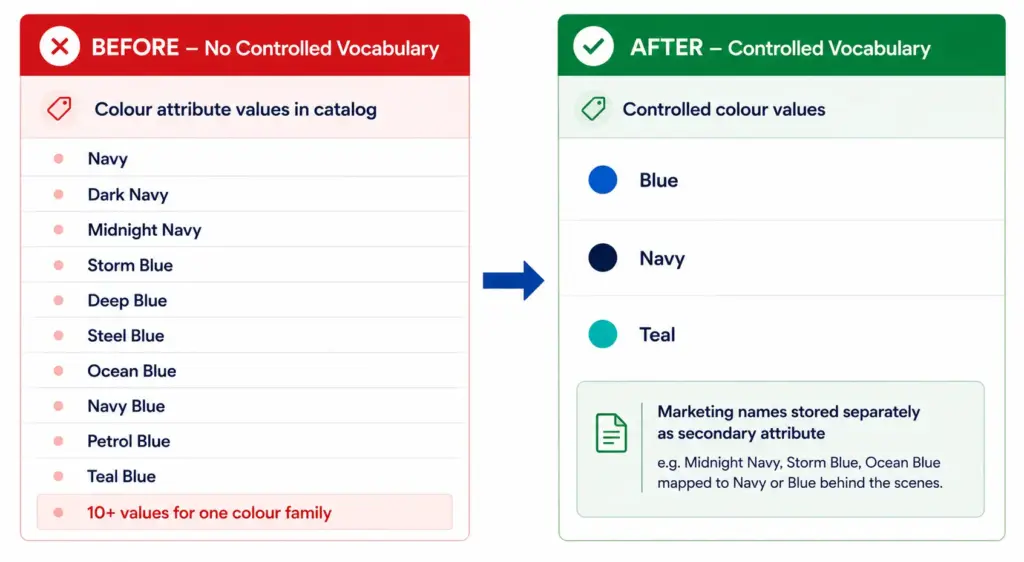
Define a controlled vocabulary for every filterable attribute before any product data is entered. For colour: 10–15 normalised values (Blue, Red, Green, Black, White, Grey, Yellow, Pink, Purple, Brown, Orange, Beige, Multi). For size: the exact size labels used on your products (XS, S, M, L, XL, XXL). For material: the primary material categories relevant to your catalog (Cotton, Polyester, Nylon, Leather, Wool, Linen, Silk).
Attribute Completeness — The Filter Coverage Problem
An attribute that is missing from 30% of your products means a filter on that attribute returns 30% fewer results than it should. A buyer filtering for “navy” gets an incomplete result set — products that exist in navy but are missing the colour attribute are hidden.
Target completeness thresholds by attribute priority:
- Required attributes: 100% target. Any product below 100% is incomplete and should not be published until fixed.
- High-impact filter attributes: 95%+ target. Attributes that drive significant filter usage should be as close to complete as possible.
- Recommended attributes: 80%+ target. Aim for high coverage but acknowledge that some edge-case products may not have applicable values.
Run regular completeness audits using the Completeness Checker to monitor which attributes are falling below target thresholds as your catalog grows.
Attribute Design Mistakes That Kill Conversion
- Free-text attributes for filterable properties — a free-text Colour field cannot be used as a filter reliably. Filterable attributes must use controlled value lists.
- Too many attributes per category — if a category has 30+ attributes, data entry completeness drops because teams skip fields. Keep required attributes to 8–12 per subcategory.
- Global attributes applied to irrelevant categories — a “Number of Seats” attribute on all home goods products adds noise to furniture and lighting simultaneously. Category-specific attributes belong in category-specific attribute sets.
- Attributes without unit standards — storing weight as “2kg”, “2 kg”, “2.0 KG”, and “2000g” in the same field breaks sorting and filtering by weight. Define units per attribute and enforce them.
- Marketing names as attribute values — “Dusty Rose” as a colour value is correct for product copy but wrong for a filter attribute. Store marketing names separately; use normalised values for filterable attributes.
The LynkPIM Product Data Modeling feature enforces controlled vocabularies, required attribute validation, and completeness tracking at the category level — preventing attribute quality degradation as catalogs scale. Start free at lynkpim.app/pricing . Also see Faceted Navigation and Product Taxonomy for how attributes connect directly to your filter system.
Frequently Asked Questions
What are product attributes in ecommerce?
Product attributes are the structured properties that describe what a product is and how it differs from others — Colour, Size, Material, Brand, Processor Speed, Number of Seats, Waterproof Rating. They power site filters, search matching, channel feeds, and product comparison functionality. Without structured, consistent attribute data, none of these functions work reliably.
What is the difference between required and optional product attributes?
Required attributes are those without which a product cannot be correctly sold or displayed. Optional attributes improve discoverability and filtering. In practice, any attribute that drives significant filter usage should be treated as effectively required — missing it hides products from buyers who use that filter, regardless of its formal classification.
Why should product attribute values use controlled vocabularies?
Controlled vocabularies prevent inconsistent values that break filters and search. Without them, you end up with Navy, Dark Navy, Midnight Navy, Storm Blue, and Ocean Blue as separate filter options instead of a single Blue. Controlled vocabularies ensure every product with a blue attribute uses exactly the same value — making filters accurate and site search effective.
How many attributes should each product category have?
Most subcategories need 5–8 required attributes and 5–10 recommended attributes. More than 15–20 required attributes creates data entry burden that reduces completeness — teams start skipping fields. The right number depends on the product type and the filtering decisions buyers make in that category. Start with the attributes that drive filter usage and add more based on analytics.

By Binu Mathew
CEO @ itmarkerz technologiesBinu Mathew is the CEO of itmarkerz technologies and founder of LynkPIM — a modern product information management platform built for growing e-commerce brands. He has spent years working at the intersection of product data, digital commerce, and catalog operations, helping teams eliminate data silos, enforce quality standards, and publish accurate product content at scale. His work spans PIM strategy, marketplace syndication, and Digital Product Passport compliance.
Use These PIM Tools Next
- Use the PIM Readiness Assessment to Benchmark Your Team
- Check Catalog Health Score Before Expanding Channels
- Audit Required Product Fields with the Completeness Checker
- Validate GTIN, UPC, and EAN Codes Before Publishing
- Assess Team Capability Gaps Before Process Changes
- Evaluate Data Governance Maturity for Scaled Catalog Operations
Build Your Product Data Roadmap
Move from theory to execution with free tools and a practical PIM implementation path.