A product taxonomy is the hierarchical classification system that organizes every product you sell into departments, categories and subcategories, and attaches to each level the attributes and rules its products must follow. It decides where a product lives in your catalog, which fields it needs before it can be published, and how it maps to your site navigation, search filters and sales channels such as Google Shopping.
This guide explains what a product taxonomy is, how it differs from attributes and from Google’s product category, and how to build one step by step, with worked examples for fashion, furniture and B2B industrial catalogs. A free product taxonomy template is linked in the build steps.
In short
- A taxonomy is a classification system plus its rules, not just a menu. Categories organize products; attributes describe them.
- Start from your real products, design a small set of top-level categories, keep the hierarchy shallow and use attributes for variation.
- Keep your internal taxonomy separate from Google’s product category. Map each leaf category to the most specific Google category and keep that mapping in one place.
- Give the taxonomy an owner and a review rhythm, or it drifts.
What is a product taxonomy?
The word comes from the Greek taxis (arrangement) and nomos (law or method): the rules by which things are arranged. In ecommerce, a product taxonomy answers three questions for every product: what type of product is it, which category does it belong to, and which department sits above that category. Those questions map to the levels most catalogs need, from department down to product type.
| Level | Name | Example |
|---|---|---|
| 1 | Department | Clothing |
| 2 | Category | Men’s Clothing |
| 3 | Subcategory | Jackets |
| 4 | Product type | Rain Jackets |
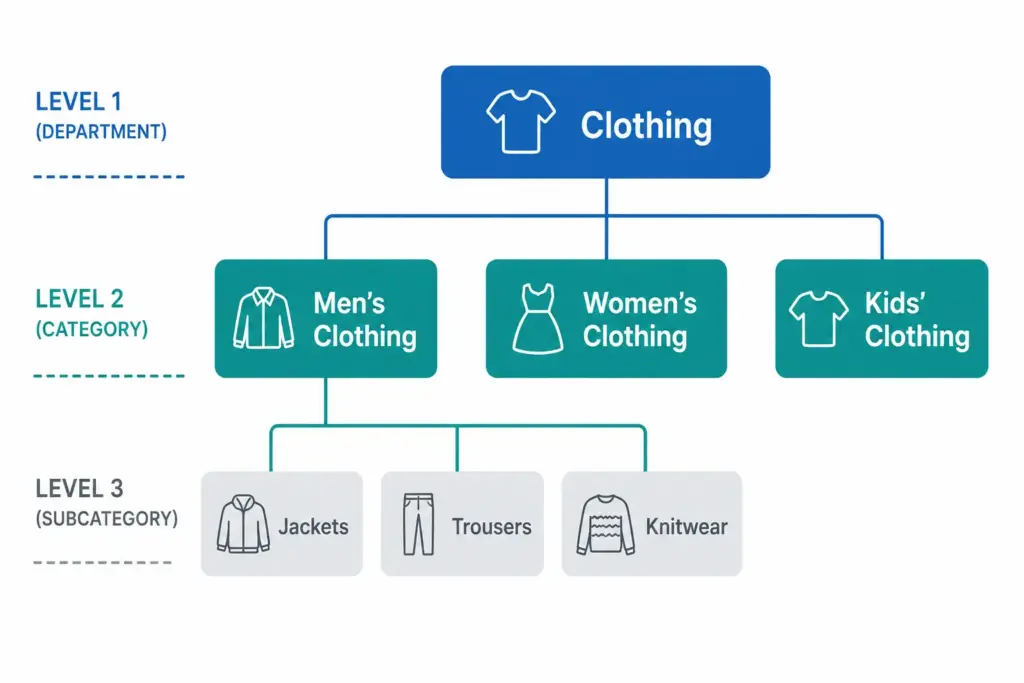
Three-level product taxonomy example: Clothing at level 1, Men's, Women's and Kids' Clothing at level 2, and Jackets, Trousers and Knitwear under Men's Clothing at level 3
Every product sits at the most specific level, never at the top. A product is not just “Clothing”; it is a men’s rain jacket.
What a product taxonomy controls
- Attribute sets. A t-shirt needs neckline and sleeve length; a laptop does not.
- Validation rules. For example, every electronics product needs a GTIN, plus an energy label where one applies.
- Navigation and search. Filters only work when colour, size or material are structured attributes on products in the right category.
- Channel feeds. Google Shopping, marketplaces and wholesale partners each use their own category structure, and your taxonomy is what you map from.
- Content requirements. Which information the team has to collect for each category.
Why it matters
A weak taxonomy shows up as operational problems before it shows up as lost sales. Without clear rules, every new product is a judgment call and different people decide differently. Products land in the wrong category, get the wrong attribute set, and required fields go missing without anyone noticing. Channel feeds turn into a manual categorization job for every channel. A clear taxonomy removes those decisions from the day-to-day.
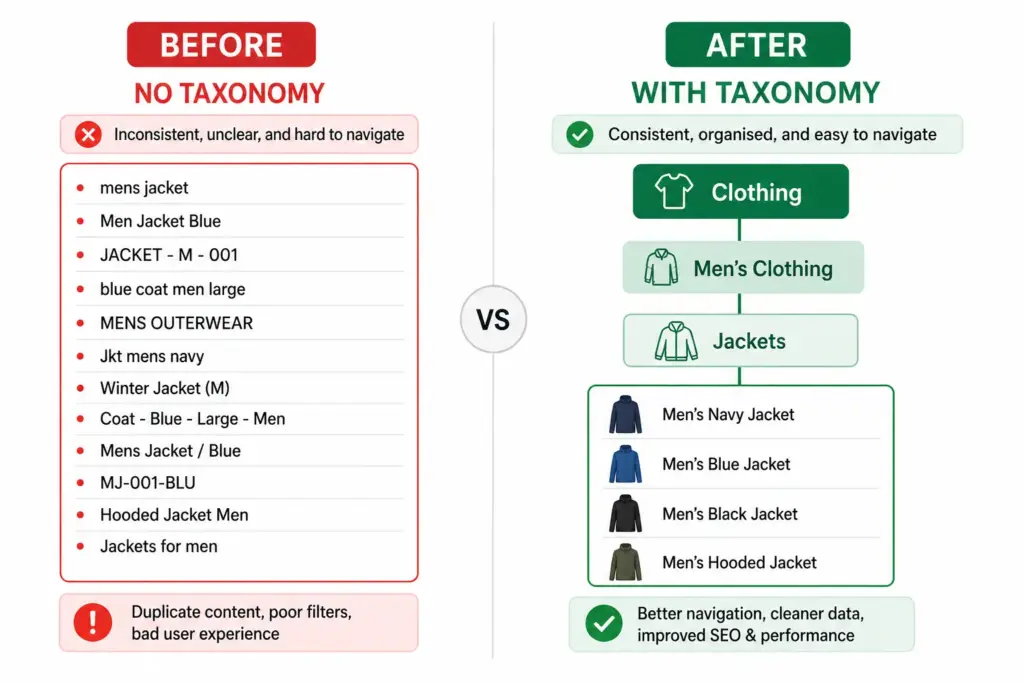
Before and after comparison: an unstructured list of inconsistent product names next to a clean Clothing, Men's Clothing, Jackets hierarchy with product variants
Taxonomy vs categories vs attributes vs Google product category
These terms are often used as if they were the same thing. They are not:
| Term | What it is | Example | Who controls it |
|---|---|---|---|
| Taxonomy | The whole classification system and its rules | Your department, category and subcategory structure, naming rules and attribute sets | You |
| Category | One node in the taxonomy | Men’s Jackets | You |
| Attribute | A property of a product within its category | Color: navy. Size: L. Material: nylon | You, value by value |
| Google product category | Google’s own classification, sent in the google_product_category field of a Shopping feed |
Apparel & Accessories > Clothing > Outerwear > Coats & Jackets (ID 5598) | |
| Product type | Your own category path, sent in the product_type field of a Shopping feed |
Men’s > Jackets > Rain Jackets | You |
The taxonomy tells you where a product lives. Attributes describe what it is. A product without a place in the taxonomy cannot be found by browsing; a product without attributes cannot be filtered or matched to specific searches. You need both.
Google’s taxonomy is a separate list that you map to, not a replacement for yours. Google’s official file (version dated 2021-09-21) lists 5,595 categories in 21 top-level groups, up to seven levels deep. Google lists google_product_category as optional for each product and assigns a category automatically if you leave it out. When you set it, submit either the numeric ID or the full path (not both) and use the most specific category that describes the product. Some Google categories, such as Apparel & Accessories, add their own required fields, which is one reason the value matters.
Several of your categories can map to one Google category. Google has a single Shoes category (ID 187), so every shoe type in your taxonomy maps there and the difference between a trainer and an Oxford stays in attributes. The full comparison is in Google product category vs your internal taxonomy , and the Google product category taxonomy guide covers how to find the right ID.
How to build a product taxonomy: step by step
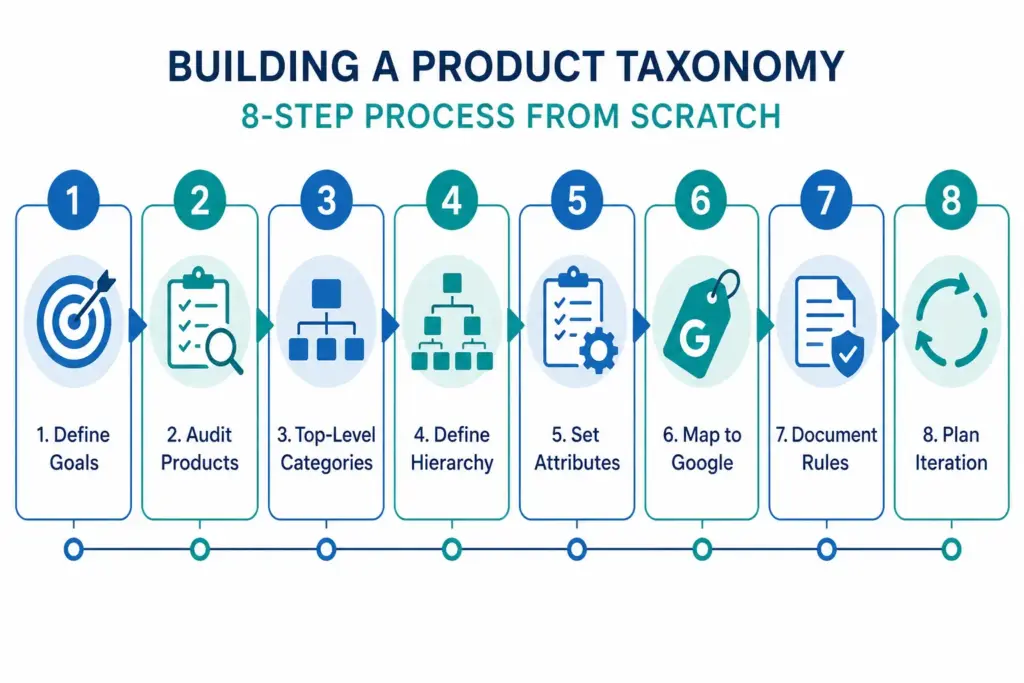
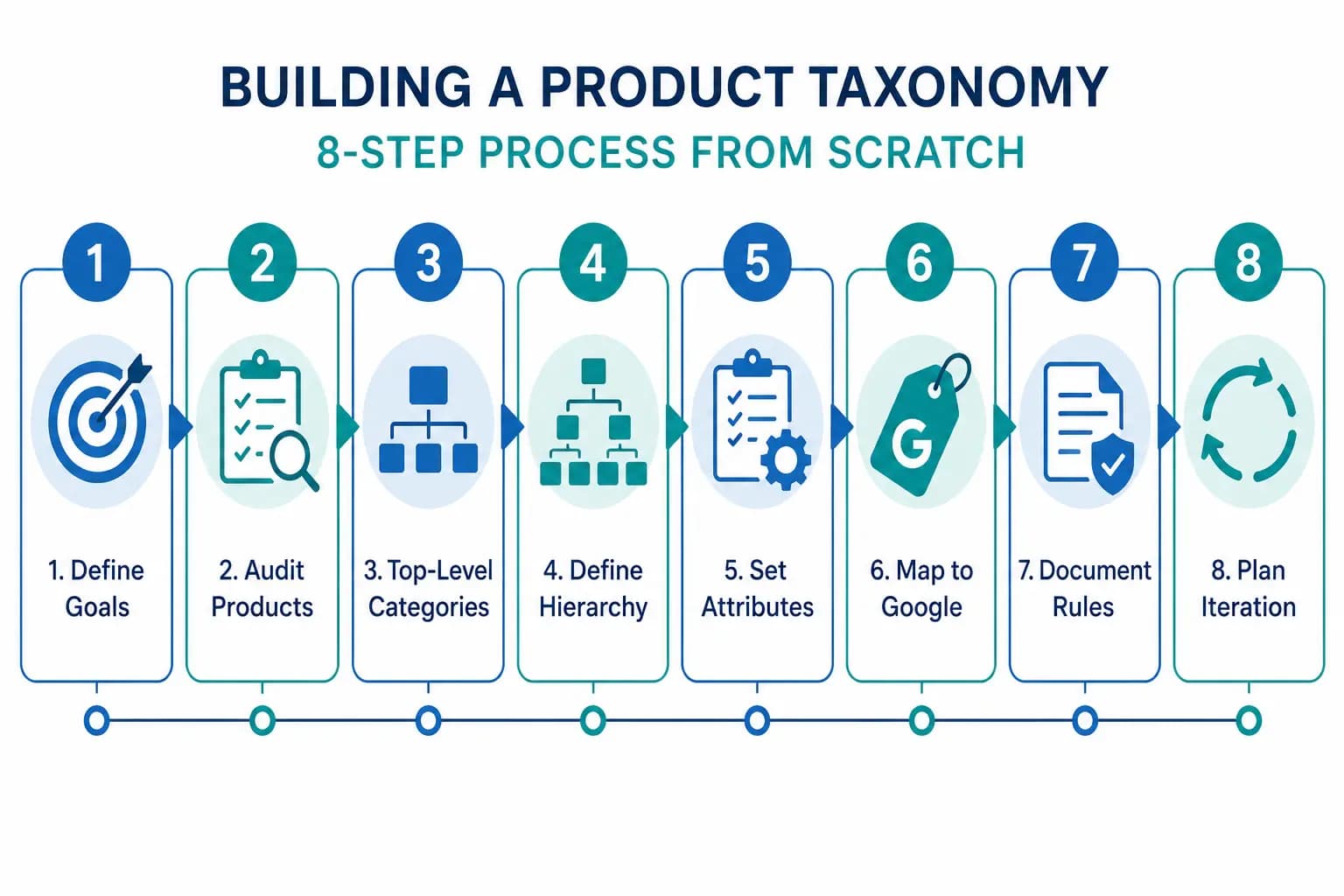
Eight-step process for building a product taxonomy: define goals, audit products, top-level categories, define hierarchy, set attributes, map to Google, document rules, plan iteration
Step 1: Define what the taxonomy has to do
Before you name a category, decide which jobs it must do. Most ecommerce catalogs need all three at once: power site navigation and search, map cleanly to channel requirements, and organize internal operations so product teams and merchandisers can find, update and report on products. These jobs sometimes conflict. A taxonomy built only for internal operations often does not match how customers search. Settle the priority first, because it prevents rework.
Step 2: Start from your products, not a blank page
Export every SKU and read the whole list before designing anything. Look for natural groupings, edge cases that do not fit anywhere, how many products fall into each potential category, and which attributes products in the same group share. A category with two products next to one with two thousand usually means the hierarchy is off. You do not need to model the whole universe: start with the product lines that matter most to revenue and extend from there.
Step 3: Design the top-level categories
Top-level categories should be broad enough to stay stable and specific enough to mean something. Five to twelve is a common range for a single store; fewer is often too broad, many more crowds the navigation. (Google’s own taxonomy has 21 top-level groups because it has to cover every kind of product, not one store’s range.) A practical test: someone who has never seen your catalog should be able to place any product in the right top-level category without thinking.
There are two common ways to start. Customer-first: use site search data, Search Console queries and the way customers describe what they want. Google-first: start from Google’s top level, which makes channel mapping easier later; you can still use different, customer-facing names. For a fashion store the top level might be Women’s, Men’s, Kids, Footwear and Accessories. For home goods it might be Furniture, Kitchen & Dining, Bedding & Bath, Home Decor and Lighting.
Step 4: Build the hierarchy (and stop early)
Most catalogs need at least three levels: department, category and subcategory. Larger catalogs add a fourth for product type. Going deeper rarely helps and makes the structure harder to maintain. Google’s taxonomy shows the same pattern: 5,150 of its 5,595 categories (92%) sit within the first five levels, and only 445 go down to levels six and seven.
The most common ecommerce category hierarchy mistake is encoding every characteristic as a level. Instead of Clothing > Men’s > Tops > Shirts > Casual > Short Sleeve > Cotton > Crew Neck, use Men’s Shirts > Casual Shirts and let attributes carry sleeve length, material and neckline. Categories group products that need the same kind of information; attributes describe the variation within them. For the structural trade-offs, see flat vs hierarchical product taxonomy , and for how categories feed filters, faceted navigation and product taxonomy .
Step 5: Define attributes and rules per category
This is the step most teams skip, and it is why many taxonomies fall apart. For each lowest-level category, document which attributes are required (a product cannot be published without them), recommended, and optional. An example for one category:
| Women’s T-Shirts | Attributes |
|---|---|
| Required | Size, color, material composition, neckline, sleeve length, care instructions, at least two images |
| Recommended | Fit type, pattern, occasion, size chart |
| Validation rules | Material composition adds up to 100%; price is greater than zero; description meets your minimum length and each channel’s maximum |
This becomes your data quality checklist: a product cannot go live until its category’s required attributes are complete. The Product Data Completeness Checker shows where a catalog falls short.
Step 6: Map to Google and your other channels
Your internal taxonomy is the source of truth; channels get a mapping from it. Map every leaf category to the most specific Google category, once, and maintain the mapping centrally. Use Google’s official taxonomy file to find IDs, or the Google Product Category Finder .
| Your category | Google product category | ID |
|---|---|---|
| Women’s T-Shirts | Apparel & Accessories > Clothing > Shirts & Tops | 212 |
| Women’s Dresses | Apparel & Accessories > Clothing > Dresses | 2271 |
| Men’s Jackets | Apparel & Accessories > Clothing > Outerwear > Coats & Jackets | 5598 |
| Men’s Running Shoes | Apparel & Accessories > Shoes | 187 |
Google has no separate t-shirt category, so neckline and sleeve length stay attributes, and all shoes share one Google category. Amazon and other marketplaces keep their own structures, which differ by marketplace, so keep one mapping column per channel. The category mapping guide covers supplier-to-internal mapping rules and channel mappings in depth.
Step 7: Test with real products, then document the rules
Before you roll the taxonomy out, test it on a sample of 50 to 100 products that represent the range: best sellers, new products, bundles and variants, and the edge cases that do not fit neatly. Can the team categorize them without debate? Do the attribute sets make sense? Fix gaps now, before ten thousand products are categorized the wrong way. Then write it down: the full category tree, what belongs in each category and what does not, attribute sets, naming conventions, exception rules and who can change what.
Start from a template instead of a blank sheet: download the free product taxonomy template (Excel) with starter structures for five industries, attribute sets and Google category IDs, or read what is inside the template first. It is also available in French and German .
Step 8: Plan for change and assign an owner
No taxonomy survives a growing catalog unchanged. New product lines need categories, edge cases will appear, and a crowded subcategory will need splitting. Assign a taxonomy owner with the final say on structure, naming and changes, usually someone in product operations, data governance or merchandising. A simple division of responsibility:
| Task | Taxonomy owner | Product team | Merchandising | IT / systems |
|---|---|---|---|---|
| Create new categories | Responsible | Consulted | Consulted | Informed |
| Define attribute sets | Responsible | Consulted | Informed | Informed |
| Approve category changes | Responsible | Consulted | Consulted | Informed |
| Map to external taxonomies | Responsible | Consulted | – | Consulted |
| Periodic review | Responsible | Informed | Informed | – |
Review the structure at least once a year against site search data, channel performance and catalog growth, and more often while the catalog is changing quickly. Signs that it is time for a rebuild include a large “Other” or “Miscellaneous” category, products that sit in several categories with conflicting attribute requirements, inconsistent category names, and mapping to channels that has stopped being clean. The taxonomy audit checklist walks through a review, and how to migrate a product taxonomy covers changing a live structure without breaking the store.
Product taxonomy examples
The principles stay the same across industries; the depth, attributes and rules change. Three worked examples:
Fashion
Fashion taxonomies are shaped by size systems, color and seasons. A typical structure is Women’s > Tops > T-Shirts, with sleeve length and neckline as attributes rather than extra levels. Color needs two fields, a marketing name for the product page and a normalized value for filters and feeds, and size needs to declare the sizing system it uses. The mapping table above shows how these categories land in Google’s taxonomy. The full structure, attribute sets by subcategory and seasonal category handling are in the product taxonomy for fashion ecommerce guide .
Furniture and home goods
Customers search by room, style, material and size, which raises the first design question: organize by room or by product type? Types such as sofas, tables and beds map directly to Google’s furniture categories, while a side table can belong in several rooms. A common answer is a type-based hierarchy with room as a filterable attribute, so you get both navigation paths without placing products in two categories. Dimensions (width, height, depth) and weight are attributes furniture buyers need before they purchase, and material works best as a marketing name plus a normalized value. On Google’s side, sofas map to Furniture > Sofas (ID 460) and dining tables to Furniture > Tables > Kitchen & Dining Room Tables (ID 4355). See product taxonomy for home goods and furniture for the complete structure.
B2B industrial
A B2B product taxonomy serves buyers who often know the part number, material grade and certification they need. It is usually anchored to an established classification standard such as UNSPSC, eCl@ss or GS1 GPC as the internal backbone, with buyer-friendly category names as a display layer on top. The attributes are technical: for a bolt, thread standard, material grade, head type, length and finish; for compliance, items such as CE marking, RoHS, REACH, IP rating and the industry standard the product is made to. Part numbers, minimum order quantities and quantity-break pricing belong in structured fields, not descriptions. Google’s taxonomy is built for retail Shopping feeds, so map to it only where you sell through Shopping: hex bolts, for example, map to Hardware > Hardware Accessories > Hardware Fasteners > Nuts & Bolts (ID 1739). The product taxonomy for B2B industrial products guide has the full structure.
Other industry guides: food and beverage , electronics and beauty and cosmetics .
Product taxonomy best practices
- Design for customers and operations. Build the master taxonomy for operations: attribute control, validation and the data model. Then give customers navigation views that map to it. Navigation can be merchandising-driven (“Best Sellers”, “New Arrivals”); the taxonomy should be data-driven.
- Pick one naming convention and enforce it. Decide singular or plural, possessive or not, and broad-to-specific or specific-to-broad. Then document it. “Men’s Running Shoes” and “Shoes for Men” in the same tree is how catalogs get messy.
- Keep it shallow and use attributes for variation. Categories group products that need the same information; they are not for describing every characteristic.
- Let categories control rules, not just labels. A category is a contract: products in it have these attributes, follow these validation rules and meet these quality standards. Otherwise it is only a navigation menu.
- Give each product one primary category. It controls the attribute set. Secondary categories can exist for navigation or merchandising, so attribute requirements never conflict.
- Map once, at leaf level, and keep the mapping in one place. Update it when a channel changes its taxonomy.
- Assign an owner and review on a schedule. Without governance, “Miscellaneous” categories appear.
Common product taxonomy mistakes
- Copying a competitor’s taxonomy. It fits their catalog, customers and operations, not yours. Study it, then build your own.
- Treating taxonomy and navigation as the same thing. They overlap, but they answer different questions.
- Creating “Other” or “Miscellaneous” categories. They become dumping grounds. A large one means the model is broken.
- Building only for today’s catalog. Think one or two product expansions ahead without over-engineering.
- Mapping to parent categories instead of leaf categories. A vague Google category gives Google a poorer description of the product.
- No owner and no approvals. If everyone can create categories, the structure turns into a free-for-all.
Product taxonomy guides by topic
- Mapping and channels: ecommerce product taxonomy: category mapping guide , Google product category taxonomy: the complete guide , Google product category vs internal taxonomy and Shopify product taxonomy: categories, attributes and metafields .
- Structure: flat vs hierarchical taxonomy , faceted navigation and taxonomy and product data modeling for PIM: taxonomy, attributes and variants .
- By industry: fashion , home goods and furniture , B2B industrial , food and beverage , electronics and beauty and cosmetics .
- Review and change: taxonomy audit checklist and how to migrate a product taxonomy .
- Search impact: how bad taxonomy kills site search and ecommerce site search and filters: taxonomy rules .
- Template and terms: free product taxonomy template and the PIM glossary .
Manage your product taxonomy in LynkPIM
A spreadsheet is a good place to design a taxonomy. Once you have to enforce it across many products and people, it helps to keep the structure and its rules in the system where products live. In LynkPIM you can:
- build the category tree with top-level groups and child categories, and assign products to them;
- create typed attributes with allowed options and required or validation behavior;
- group products that share a field set into product families, so a family’s schema defines what its products need;
- check products against completeness and quality rules before they reach a channel; and
- use import mappings to map source columns to LynkPIM fields and reuse the mapping across import jobs.
The documentation walks through attribute and taxonomy setup and product families and family schemas ; product data modeling gives the wider picture.
Start free : LynkPIM is free for up to 25 products, with every core feature included. See pricing for what happens beyond that, or download the free taxonomy template to design your structure first. To see where your product data stands today, take the PIM Readiness Score .
Frequently asked questions
What is a product taxonomy?
A product taxonomy is the hierarchical classification system that organizes products into departments, categories and subcategories, and defines the attributes and rules for each level. It powers site navigation and filters, channel feeds and internal catalog management.
How do I build a product taxonomy?
Define what the taxonomy must do, audit your products, design 5 to 12 top-level categories, build a hierarchy of usually three to five levels, define required and recommended attributes per category, map each leaf category to Google’s taxonomy and your other channels, test with real products and document the rules, then assign an owner and review it on a schedule.
What are examples of a product taxonomy?
A fashion example is Clothing > Men’s Clothing > Jackets > Rain Jackets. A furniture example is Furniture > Sofas > Corner Sofas. An industrial example is Fasteners & Fixings > Bolts > Hex Bolts. The fashion, home goods and furniture, and B2B industrial guides show full structures with attribute sets.
What are product taxonomy best practices?
Build the master taxonomy for operations and treat website navigation as a view of it, use one documented naming convention, keep the hierarchy shallow and use attributes for variation, let categories control attribute sets and validation rules, give every product one primary category, map to Google at leaf level, and assign an owner who approves changes.
How is a B2B product taxonomy different?
B2B buyers often search by part number and technical specification, so a B2B taxonomy is often anchored to a classification standard such as UNSPSC, eCl@ss or GS1 GPC. It carries specification and compliance attributes, for example thread standard, material grade, CE marking or IP rating, and treats part numbers, minimum order quantities and quantity-break pricing as structured data.
Is there a free product taxonomy template, and which tool should I use?
Yes. The free LynkPIM product taxonomy template is an Excel workbook with starter structures for five industries, attribute sets and Google category IDs, in English, French and German. A spreadsheet is enough to design a taxonomy. Move it into a PIM when you need to enforce attribute sets, validation and channel mapping across many products. LynkPIM is free for up to 25 products.
Sources and how we checked
Facts about Google’s taxonomy (5,595 categories, 21 top-level groups, up to seven levels, and every ID and path in this guide) were checked in October 2026 against Google’s
official taxonomy file
, version dated 2021-09-21. Statements about the google_product_category and product_type fields follow Google Merchant Center Help for
Google product category
and
product type
. Level counts, attribute lists and category counts such as “five to twelve top-level categories” are common practice and starting points, not standards. Statements about LynkPIM follow the product documentation linked above. Last updated: October 2026.