Skip to content

Catalog Management

Product Catalog Management: Definition, Process & Software (2026 Guide)

Binu Mathew

By Binu Mathew

CEO, itmarkerz technologies

Published Updated 22 min read

Product Catalog Management: Definition, Process & Software (2026 Guide)

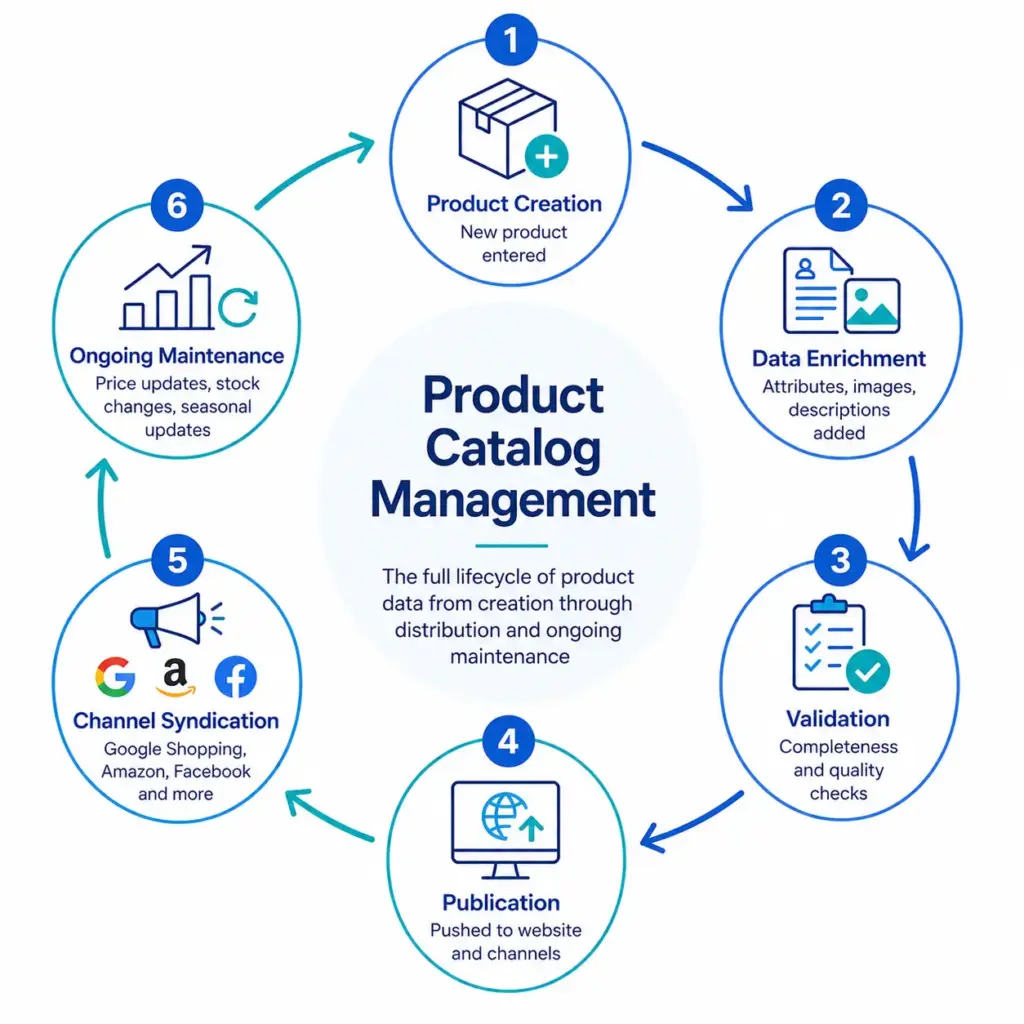
Product catalog management is the ongoing work of creating, organizing, enriching, validating and publishing product data so that every channel shows the same complete, accurate information. A product catalog in ecommerce is the structured record of everything you sell: names, descriptions, specifications, prices, identifiers, images, categories and the relationships between products and their variants.

This guide covers what a product catalog is, the catalog management process step by step, how to manage large SKU catalogs, when a spreadsheet stops being enough, how to choose catalog management software, and how to improve a catalog that has grown messy. Each section links to a deeper guide where one exists.

Ecommerce manager organizing a product catalog in PIM software

Ecommerce manager organizing a product catalog in PIM software

Product catalog management for ecommerce teams

In short

  • Catalog management is a process with owners and rules, not a tool. Software helps once the process is defined.
  • Most catalog problems trace back to five causes: no single source of truth, no taxonomy, no validation, no publishing workflow and no audits.
  • Spreadsheets work at small scale. The break point is usually many channels, many suppliers or many people editing at once, not a fixed SKU count.
  • Build in this order: structure, taxonomy, SKU conventions, required attributes, image standards, then validation.
  • Start with a 90-day plan: baseline the quality, fix the top categories, assign owners, then automate the checks.

What is a product catalog in ecommerce?

A product catalog (spelled product catalogue in British English, where the practice is also called catalogue management) is the single place that describes every product you sell. Your storefront pages, marketplace listings, shopping feeds, price lists and sales sheets are all built from it. When people say “product cataloging” they usually mean the act of entering, classifying and describing products in that record.

It is related to, but not the same as, several neighboring terms:

Term What it is How it relates to the catalog
Product feed An export of selected catalog data in the format one channel requires, such as Google Shopping or a marketplace Built from the catalog; not the source of truth
Product information management (PIM) Software for structuring, enriching, validating and publishing product data A common system for managing the catalog. See what is PIM
Inventory management Tracking stock levels and locations Uses catalog data such as SKUs but is a different discipline
Master data management (MDM) Governing enterprise data across many domains Product is one domain. See PIM vs MDM vs DAM vs PXM
Digital asset management (DAM) Storing images, video and documents The catalog references assets that a DAM or PIM holds

What a product record contains

Every record carries three kinds of fields. Writing them down as a field specification gives everyone who edits product data the same standard.

  • Universal fields that every product needs whatever its category: SKU, product name, description, price, category, brand, a product identifier (GTIN, or a documented reason it has none), primary image and availability.
  • Category-specific fields that apply within one part of the catalog: color and size for apparel, processor and memory for electronics, width, height and depth for furniture.
  • Channel-specific fields written for one destination, such as a Google Shopping title or marketplace bullet points. Check each channel’s own required fields, because they change.

What product catalog management covers

It helps to split catalog management into seven parts, each with an owner and a quality standard.

1. Data onboarding

Getting data in from suppliers, ERP exports, manufacturer feeds and internal teams. The key task is mapping each source to your own fields and values while keeping the original value for traceability. See how to clean supplier product data .

2. Taxonomy and classification

The category structure that decides where a product lives and which attributes apply. A good taxonomy gives each product one primary place and uses controlled attributes for everything else. Start with the product taxonomy guide .

3. Attributes and variants

The specification fields and the model for options such as size and color. Decide what belongs to the parent product and what belongs to each variant, and use controlled values wherever customers filter. The product data modeling hub covers this in detail.

4. Enrichment

Adding the content that helps people buy: clear titles, descriptions, bullets, size guides, use cases, images and documents. See product data enrichment .

5. Quality and validation

Rules that check completeness, accuracy, consistency, uniqueness and freshness before data is published. The product data quality scorecard shows how to measure it.

6. Publishing and syndication

Sending approved data to your storefront, marketplaces, feeds, print catalogs and partners, each with its own format and required fields. See the guides to Google Shopping feeds and Amazon feeds .

7. Governance

Who can change what, how changes are approved and how the rules themselves evolve. See product data governance .

Why catalog management matters

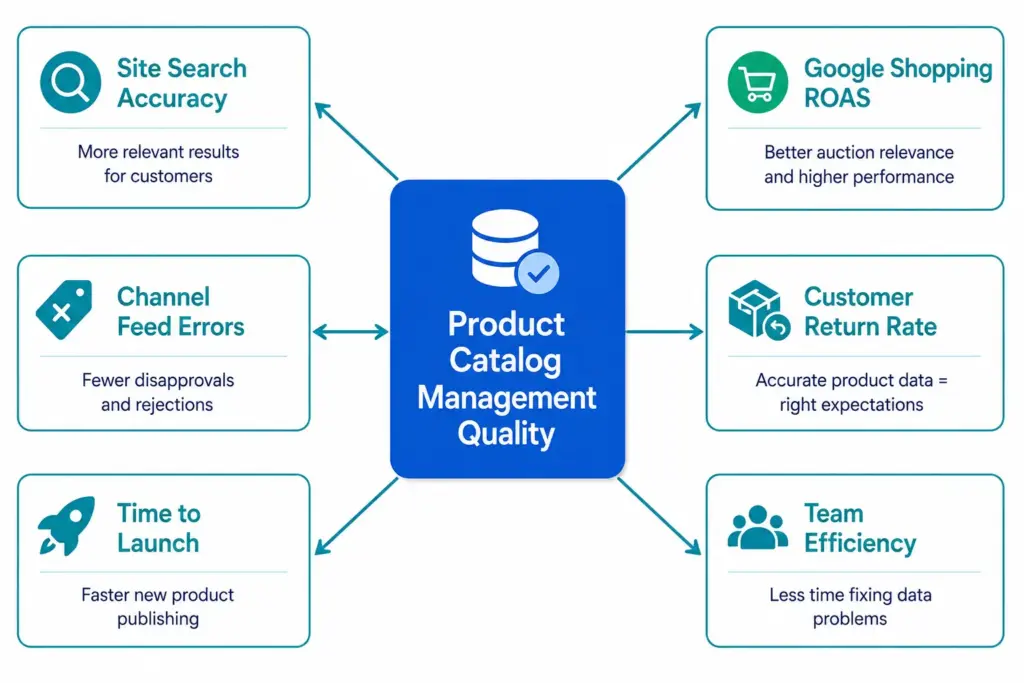
Product data is the raw material of ecommerce. Weak data shows up as weak results, usually in several places at once:

Symptom Typical data cause Business effect
Customers cannot find products Inconsistent categories, missing attributes, no synonyms Lost sales, high search exit rate
Marketplace or Google Shopping rejects listings Missing identifiers, wrong category, required fields empty Products not shown, wasted ad budget
Returns and support tickets rise Wrong dimensions, unclear variants, mismatched images Higher cost per order
Launches take weeks Manual copy-paste between files and systems Slow time to market
Teams argue about which file is right No single source of truth Rework and low trust in data

The real cost of bad product data goes through how these costs add up.

Supplier product data transformed into a structured ecommerce product catalog

Supplier product data transformed into a structured ecommerce product catalog

Turn supplier data into a structured catalog

The product catalog management process, step by step

Every product moves through a lifecycle. Writing it down, with an owner and a check at each step, is the single most useful thing you can do for catalog quality.

Step What happens Check before moving on
1. Intake Product data arrives from a supplier, ERP or internal team Required identifiers present; source recorded
2. Classify Product is assigned one primary category Category is a leaf; attribute set applied
3. Normalize Units, names and values mapped to controlled lists No free-text colors, sizes or materials
4. Enrich Titles, descriptions, images and documents added Content standards met for the category
5. Validate Rules run for completeness, accuracy and uniqueness No hard-stop errors; score above your threshold
6. Approve A reviewer signs off, with change history kept Approval recorded
7. Publish Data is sent to each channel in its required format Channel validation passes
8. Monitor Rejections, returns and search behavior reviewed Issues feed back into rules
9. Retire Discontinued products are archived and redirected No live links or feed entries remain

Starting a catalog from scratch: the order that avoids rework

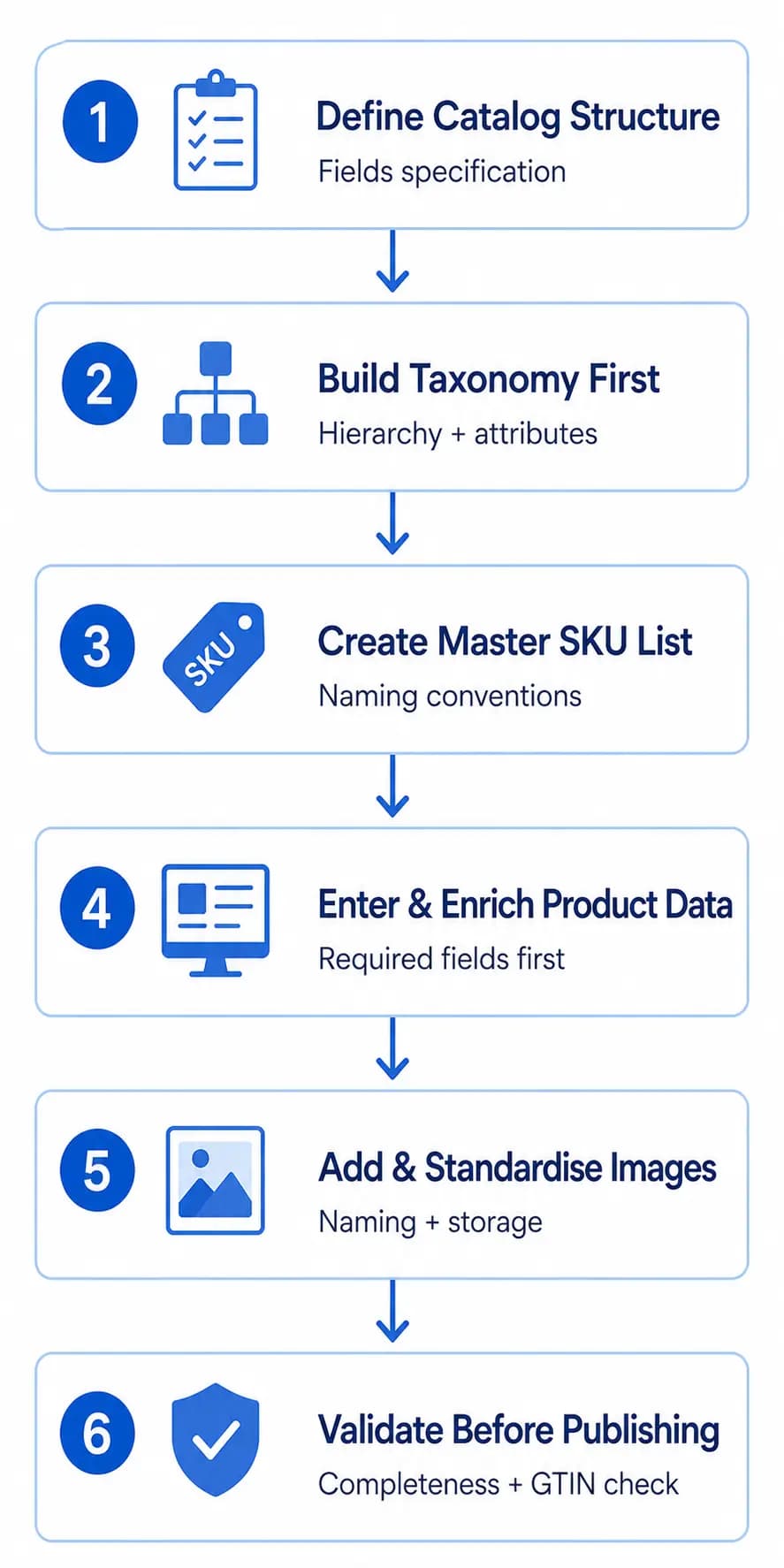
Most rework comes from entering products before the structure exists. If you are building a catalog, do the work in this order:

  1. Define the structure. Write the universal, category-specific and channel-specific fields as a field specification before entering any data.
  2. Build the taxonomy before the products. Design the category hierarchy and the attribute set for each subcategory first; a product entered before the taxonomy exists often lands in a category that has to be changed later. The free product taxonomy template is a starting point.
  3. Set SKU conventions before creating records. SKUs are permanent identifiers; once they are in orders, feeds and platforms, changing them is a significant operational task. Choose one consistent pattern, for example a brand code, a category code and a variant code, with clear rules for how variant SKUs relate to the parent.
  4. Enter required attributes before optional ones. Completing every required field for all products first lets you publish and submit to channels; optional fields then improve performance over time.
  5. Set image standards from day one. Agree file naming, minimum dimensions that satisfy your strictest channel, formats and a folder structure. Renaming thousands of images later is one of the slowest clean-up jobs.
  6. Validate before publishing. Check completeness, identifier format, duplicate SKUs, category assignment and that image links load. The Completeness Checker and Duplicate Detector cover two of these checks, and the PIM Readiness Score shows how ready your current setup is.

Managing large SKU catalogues (1,000+ products)

There is no magic SKU count at which a catalog becomes hard to manage. Rules of thumb you may see quoted, such as 200 or 500 SKUs, describe particular teams, not a limit. What strains a catalog is the number of people editing it, the number of suppliers sending different formats and the number of channels it feeds. A small range sold in eight places with four editors can be harder to keep consistent than a larger range with one owner.

As a catalog grows, the same problems appear: inconsistent values (“Grey” and “Gray”, “S” and “Small”), duplicate records, channel versions that drift apart, products that go live incomplete and nobody who owns quality. Five practices address them:

  1. One source of truth. Every product’s authoritative data lives in one place and other systems consume it. See what single source of truth really means .
  2. One taxonomy and controlled values. Uncategorized and miscategorized products are invisible in filters and underperform in feeds, so flag them instead of letting them accumulate.
  3. Validation rules. Required fields, controlled value lists and identifier format checks that stop bad data before it is published.
  4. A defined publishing workflow. Data entry, enrichment, review, approval, publish. It stops incomplete products going live and makes each step someone’s job.
  5. Scheduled audits. A reasonable starting cadence is a completeness check each quarter, a duplicate check each month and a category review whenever the structure changes. Tighten it if your catalog changes quickly.

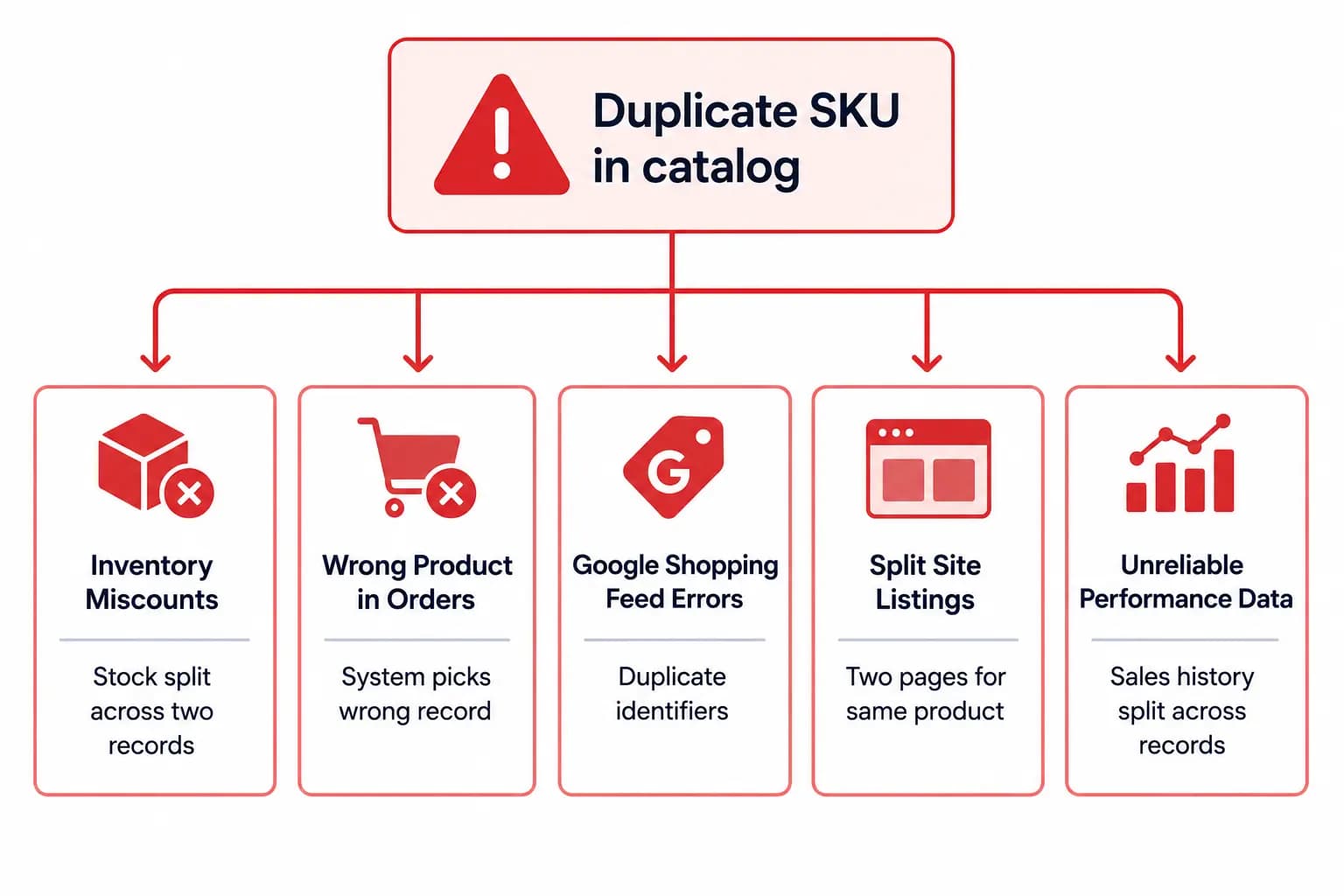
Day to day, use bulk operations for catalog-wide changes instead of editing records one by one, treat a new product launch as a small project with several steps, keep content writing separate from data entry because they are different skills, and archive discontinued products instead of deleting them so links and order history stay intact. The full walk-through is in how to manage 1,000+ SKUs , and how to find and eliminate duplicate SKUs covers the most common large-catalog defect.

Spreadsheets vs a catalog management system or PIM

A catalog management system is whatever holds your source product data and applies your rules. Most businesses move through several stages:

Option Works well when Starts to hurt when
Spreadsheets One person, one or two channels, a small range Several editors, many suppliers, version confusion, channel-specific formats
Commerce platform only (a storefront admin) One storefront and simple products You add marketplaces, languages or rich supplier data the platform does not model
ERP product records Operational data such as cost, stock and supplier codes Marketing content, rich attributes and channel formats are needed
PIM Many sources, many channels, shared ownership, validation needs The process behind it is undefined, so the tool reproduces the mess

When does a business need one?

Typical signs are several people editing the same files, supplier data arriving in different formats, repeated listing rejections, slow launches and no agreed answer to “which version is correct”. The article 12 signals you’ve outgrown spreadsheets lists them in detail, and PIM vs spreadsheets compares the two approaches side by side. A PIM is the software category used to do catalog management at scale; the practice exists with or without it, but you cannot get good results from a PIM without a defined process.

How to choose catalog management software

Write down your process first (the table above is a start), then use this checklist to compare tools:

  • Data model: category-specific attribute sets, variants, bundles and relationships between products?
  • Controlled values and normalization: can supplier values be mapped to your canonical ones, and can you keep the original?
  • Validation: required fields by category and channel, with a clear exception list?
  • Workflow and history: review and approval steps, an audit trail and a way to roll back?
  • Imports: reusable column mappings and row-level error reports, so you can test with a pilot file?
  • Channel publishing: feeds and connectors, with channel category mappings kept separate from your own taxonomy?
  • Localization: translations and market-specific overrides?
  • Integrations and API: ERP, storefront, DAM and marketplaces?
  • Roles and permissions: separate rights to edit, approve and publish?
  • Total cost: not only the license but implementation, data clean-up, extra users and channels, over several years.
  • Exit options: can you export your data, taxonomy, mappings and media?

Test the shortlist with a pilot of your messiest real products, not a clean sample. For a structured selection process, use the PIM platform evaluation guide , the RFP question list and the guide to PIM pricing and total cost .

Software or a managed service?

Some teams outsource part of the work: data entry, enrichment, supplier onboarding or migration. A service can help with a backlog, but a service is people doing work and software is the system that holds the rules. Keep the data model, approvals and quality standards in-house, in whichever system you use, and outsource volume work that follows those standards.

Centralized catalog management across channels

Centralized catalog management means one source record per product, edited once and published to many places. The alternative is editing each channel separately, which produces the “different data everywhere” problem.

  • Keep one internal taxonomy and attribute model as the source of truth.
  • Maintain a separate, versioned mapping from your categories and attributes to each channel.
  • Store channel-specific content, such as a marketplace title or a localized description, as overrides on the source record.
  • Publish from the source, not from another channel’s export.

See managing product data across Shopify, Amazon and PDF catalogs for this in practice and GTIN and UPC compliance for the identifiers channels check first.

Centralized product catalog publishing consistent product data across ecommerce channels

Centralized product catalog publishing consistent product data across ecommerce channels

Publish one product record consistently everywhere

Who owns what: roles and responsibilities

Catalog quality fails when everyone assumes someone else owns it. A simple ownership model is enough to start; in small teams one person holds several roles, as long as the responsibilities are written down.

Role Responsible for
Catalog or product data manager Overall process, standards, data model and reporting
Category manager or merchandiser Category structure, assortment and content priorities for their range
Data steward Daily quality: fixing exceptions, approving values, supplier follow-up
Content or SEO specialist Titles, descriptions, landing pages and search terms
Channel or feed owner Mappings, feed rules and rejection handling per channel
IT or integration owner Connections to ERP, commerce platform and PIM
Compliance reviewer (where relevant) Claims, documents, certificates and regulated fields

Common catalog problems and how to fix them

Problem Why it happens Fix
Duplicate products and SKUs Multiple import sources, no matching rule Match on SKU, GTIN and name similarity; block new duplicates. See duplicate SKUs
Inconsistent values (“Grey”, “Gray”) Free-text fields, many editors Controlled value lists with synonyms mapped to one canonical value
Missing identifiers Supplier data incomplete Make GTIN or MPN a hard stop for channels that require it
Wrong or missing categories Taxonomy mixed with merchandising One primary category; collections for campaigns. See the taxonomy audit checklist
Different data in each channel Edits made directly in each platform Edit once in the source; publish out
Stale prices or availability No sync from ERP or inventory Scheduled sync; freshness rule on time-sensitive fields
Nobody owns quality Shared responsibility, no accountability A named data steward per category

Catalog management metrics to track

Measure the process, not just the outcome. A small set of metrics is enough to show progress and focus effort.

Metric What it shows How to use it
Completeness rate by category Share of products with all required fields Prioritize enrichment work
Data quality score Combined completeness, accuracy, consistency, uniqueness, freshness Track the trend; set thresholds. See the PIM data quality guide
Time to market Days from intake to published Find workflow bottlenecks
Channel rejection rate Products refused by marketplaces or feeds Fix mappings and required fields
Duplicate rate Share of records flagged as duplicates Tune matching and intake
Supplier data quality Error rate per supplier Improve supplier templates and feedback
Returns and support contacts linked to product data Cost of inaccurate information Show business impact

For a quick baseline, run the free Catalog Health Score on your catalog.

Ecommerce team validating product catalog data before publishing

Ecommerce team validating product catalog data before publishing

Validate product data before publishing

Catalog management maturity stages

Stage What it looks like Next step
1. Ad hoc Spreadsheets, free-text values, no owners Define categories and core attributes; name an owner
2. Structured Taxonomy and attribute sets exist; values mostly consistent Add controlled values and basic validation
3. Governed Workflows, approvals and audit history Measure quality; automate channel checks
4. Optimized Automated rules, supplier scorecards, tuned filters and feeds Expand to new markets and channels

Many small stores start at stage 1. The move from stage 1 to stage 2 often matters most, because it is where spreadsheet chaos gives way to a catalog with a defined structure.

Tips to improve product catalog management

  • Start with the products that matter. Fix the top revenue and traffic categories first.
  • Standardize before you enrich. Clean values and categories first, otherwise you enrich bad data.
  • Make required fields explicit. Define “ready to publish” per category and channel.
  • Fix the source. If one supplier causes most errors, improve their template or add intake rules.
  • Use controlled lists wherever customers filter. Color, size, material and compatibility are common ones.
  • Schedule audits. A light quarterly review catches drift.
  • Document decisions. Keep a short log of taxonomy and attribute changes, with reasons.
  • Automate checks, not judgment. Let rules catch missing and inconsistent data so people can focus on the quality of the content.

A 90-day plan to get a messy catalog under control

Days Focus Output
1–15 Baseline Export the catalog; run the Catalog Health Score and completeness checks; list the top problems by category and supplier
16–30 Foundations Agree the taxonomy for top categories, attribute sets, controlled values and owners
31–60 Clean and enrich Normalize values; fix identifiers and duplicates; enrich the top categories to the agreed standard
61–75 Validate and publish Turn on validation rules and channel checks; clear the exception list; publish from the source
76–90 Measure and decide Re-run the baseline; report improvement; decide whether a PIM is justified. See the PIM implementation guide

Catalog management by business type

Business Main challenge Priorities
Retailer or ecommerce store Search, filters and feed approval Taxonomy, filterable attributes, titles, channel readiness. See PIM for small and mid-sized stores
Distributor or wholesaler Many suppliers, many formats, large volume Supplier onboarding, normalization, duplicate detection, automated validation
Brand or manufacturer Consistent data for many retail partners Rich content, asset management, partner-specific exports
B2B seller Technical specifications and buyer-specific catalogs Detailed attributes, variants, documents. See PIM for B2B
Fashion and apparel Size and color variants, seasonal turnover Variant model, size charts, channel requirements. See PIM for fashion

Product catalog management guides

How LynkPIM handles product catalog management

LynkPIM is a PIM built around the process above. According to its product documentation, you can:

  • Model products with a category tree, typed attributes (with allowed options and required or validation behavior where the editor offers it), product families that share a field set, variants and bundles, and reference data sets for controlled lookup values. See product model , attribute and taxonomy setup and product families .
  • Bring data in with bulk imports and reusable import mappings that map source columns to LynkPIM fields, and check the validation results and failed-row counts before scaling up. See import and export and import mappings .
  • Check quality with quality rule sets, a quality dashboard that shows score trends and completeness, a completeness view of missing fields and an issues queue where findings can be assigned. See quality rule sets and validation and product completeness .
  • Govern changes with workflows (states, transitions, reviewers and SLA tracking), change requests, earlier versions of a product and roles and permissions. See workflows and approvals .
  • Publish through channels, with a per-product view of channel readiness and publication jobs, and export reusable templates and scheduled exports. See channels and publication .
  • Manage media in a library where assets can be approved or archived and attached to products. See media library .

Product data modeling gives the wider picture, and the PIM Readiness Score shows whether your process is ready for a managed system.

Start free – up to 25 products : LynkPIM is free for up to 25 products, with every core feature included. See pricing for what applies beyond that.

Frequently asked questions

What is product catalog management?

Product catalog management is the ongoing process of creating, organizing, enriching, validating and publishing product data so that your website, marketplaces, feeds and sales teams all show complete, accurate and consistent information. It covers onboarding supplier data, taxonomy, attributes and variants, content, quality rules, publishing and governance.

What is a product catalog in ecommerce?

A product catalog is the structured record of everything an ecommerce business sells: names, descriptions, specifications, prices, identifiers, images, categories and the relationships between products and their variants. Storefront pages, marketplace listings and product feeds are built from it. A feed is an export of selected catalog data in the format one channel requires, not the catalog itself.

What are the steps in the product catalog management process?

Intake, classify, normalize, enrich, validate, approve, publish, monitor and retire. Each step needs an owner and a check before a product moves on, for example required identifiers at intake, a leaf category at classification, no hard-stop errors at validation and a recorded approval before publishing.

What is a product catalog management system, and do I need one?

A product catalog management system stores your source product data, applies a structure (categories, attributes, variants), enforces validation rules, manages workflows and approvals, and publishes data to channels. A spreadsheet can do this for a small range with one editor and one or two channels. Once several people edit, suppliers send different formats or you sell on multiple channels, a PIM or a similar system usually becomes worth it. There is no fixed SKU count at which this happens.

How do I manage a large SKU catalogue?

Keep one source of truth, enforce one taxonomy and controlled values, validate data before it is published, use a defined publishing workflow and schedule audits for completeness and duplicates. Use bulk operations for catalog-wide changes, treat product launches as small projects and archive discontinued SKUs rather than deleting them.

Is a product catalog management service the same as software?

No. Software is the system that holds and governs your product data. A service is people doing part of the work for you, such as data entry, enrichment, supplier onboarding or migration. A service can clear a backlog, but the rules, ownership and source of truth should stay with you, in whichever system you use.

About this guide

Statements about LynkPIM follow the product documentation linked above. The process steps, role tables, stage models and cadences in this guide are common practice and starting points, not standards, and no figure in it comes from a survey. This guide replaces two earlier LynkPIM articles that covered the same subject in parts. Last updated: October 2026.

TopicsCatalog OperationsEcommercePIMproduct catalog managementproduct data
Share

About the author

Binu Mathew

Binu Mathew

CEO, itmarkerz technologies

Binu Mathew is the CEO of itmarkerz technologies and founder of LynkPIM — a modern product information management platform built for growing e-commerce brands. He has spent years working at the intersection of product data, digital commerce, and catalog operations, helping teams eliminate data silos, enforce quality standards, and publish accurate product content at scale. His work spans PIM strategy, marketplace syndication, and Digital Product Passport compliance.

Free tools to try next

Put this into practice

LynkPIM keeps one governed record per product and publishes it to every channel. Your first 25 products are free, with every core feature included.