Duplicate SKUs are one of the most damaging catalog quality problems because they are invisible until they cause a serious incident — wrong products shipping to customers, inventory counts that do not match reality, Google Shopping disapprovals from duplicate product identifiers. And they are extremely common. Most catalogs that have grown over several years without strict governance have duplicate records that have never been identified.
How Duplicate SKUs Form
Duplicate SKUs rarely appear overnight. They accumulate through specific, predictable patterns:
- Multiple people creating SKUs manually without a centralised reference — two team members independently create records for the same product using different SKU formats
- Supplier data imports without duplicate checking — supplier feeds include products already in your catalog, creating a second record with the supplier’s SKU alongside your existing record
- Platform migrations — importing products from one system to another creates duplicates when migration logic fails to match existing records
- SKU reuse after product discontinuation — a discontinued product’s SKU is reassigned to a new product, creating historical confusion even if it is not technically a current duplicate
- Variant management errors — each size/colour combination of a product is created as a standalone product instead of as variants, with new SKUs each time
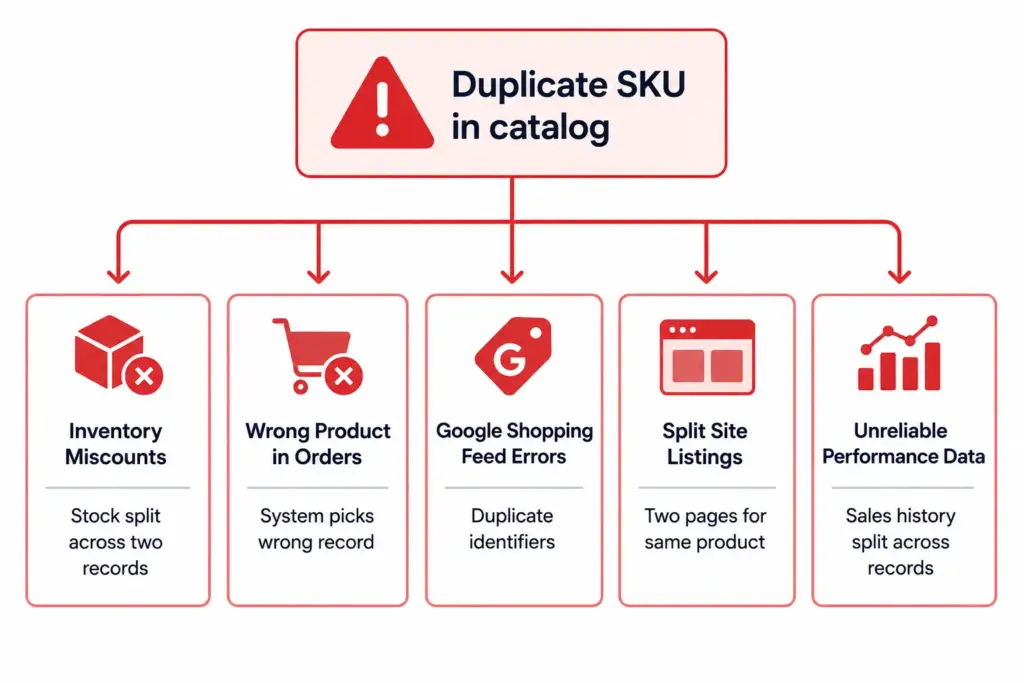
The Business Impact of Duplicate SKUs
| Problem | Impact |
|---|---|
| Inventory split across duplicate records | Stock appears lower than it is in each record — triggers false out-of-stock, missed sales, unnecessary reorders |
| Wrong record picked for orders | Wrong product ships, or the correct product ships but from the wrong inventory pool |
| Google Shopping feed errors | Two products with the same GTIN in one feed cause disapprovals for both |
| Two site listings for same product | Customers see duplicate listings, sales and reviews are split, cannibalisation of the same keyword |
| Split sales history | Performance reports undercount actual sales, making reorder and pricing decisions unreliable |
Step-by-Step: Finding Duplicate SKUs
Method 1: Exact SKU duplicates
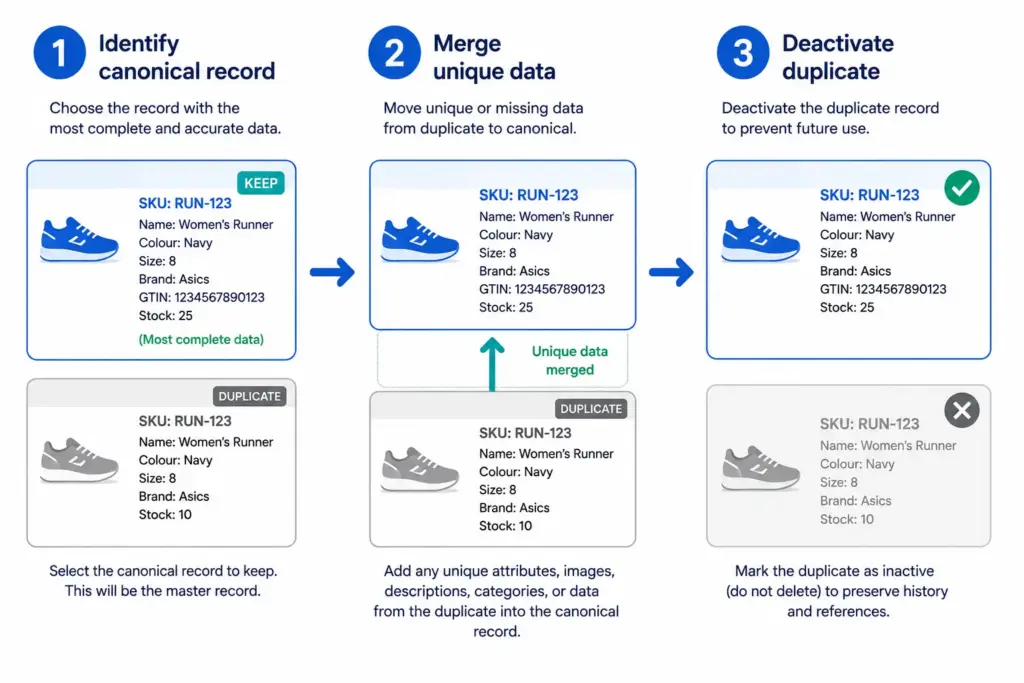
Export your full product list with SKU as the first column. Sort by SKU. Any SKU that appears more than once is a confirmed exact duplicate. Flag all instances and review which is the canonical record (typically the older record with more order history).
Method 2: GTIN-based duplicates
Export your product list with GTIN column. Sort by GTIN. Any GTIN that appears more than once (excluding variant records that legitimately share a parent GTIN) is a duplicate product with different SKUs. These are the most common type of duplicate in catalogs built from multiple supplier data imports.
Method 3: Name similarity duplicates
Sort your product list by Product Name. Review near-matches — “Columbia Rain Jacket Men Navy L” and “Columbia Waterproof Jacket Men Navy L” may be the same product entered twice with slightly different names. These require manual review because naming differences can be legitimate variants.
The Duplicate Detector automates all three detection methods across your full catalog and returns a prioritised list of confirmed and suspected duplicates for review.
How to Prevent Duplicate SKUs From Recurring
- Unique SKU enforcement — configure your platform or PIM to reject any SKU that already exists in the system. This is the single most effective prevention mechanism.
- Centralised SKU generation — assign SKUs through one system using a defined naming convention rather than allowing team members to create them manually. A sequential number generator or structured code generator (BRAND-CAT-001) eliminates manual SKU conflicts.
- GTIN validation at import — when importing supplier data, check incoming GTINs against your existing catalog before creating new records. If a GTIN already exists, update the existing record rather than creating a new one.
- Never reuse discontinued SKUs — mark discontinued products as inactive rather than deleting them, and never reassign their SKUs to new products. SKU history must remain intact for order history and audit purposes.
Run a duplicate check monthly using the Duplicate Detector as part of your routine catalog maintenance. For the full catalog health audit process, see Catalog Health Score .
Next steps: the ecommerce product taxonomy and category mapping guide ; the Product Data Completeness Checker ; the PIM Readiness Score .
Frequently Asked Questions
What causes duplicate SKUs in ecommerce catalogs?
The most common causes are: multiple team members creating SKUs without a centralised system, importing supplier data without checking for existing records, platform migrations that duplicate product records, and SKU conventions that allow reuse after product discontinuation. Supplier data imports are the most frequent source of externally-introduced duplicates in mid-to-large catalogs.
What problems do duplicate SKUs cause?
Inventory miscounts (stock split across two records), wrong products in orders (system picks wrong duplicate), Google Shopping feed errors (duplicate GTIN causes disapprovals for both records), site search returning two listings for the same product, and split sales history that makes performance reporting unreliable.
How do I prevent duplicate SKUs from being created?
Three mechanisms work together: unique SKU enforcement at the system level (reject any SKU that already exists), centralised SKU generation (all SKUs assigned by one system using a defined convention), and GTIN validation at import (check incoming product GTINs against existing records before creating new ones). Implementing all three eliminates the most common duplicate creation paths.
Product catalog management series
- Product catalog management: the complete guide : Start here: process, roles, systems, metrics and a 90-day plan.
- What is product catalog management? : A short introduction and definition.
- How to build a product catalog : Structure, taxonomy, SKUs, attributes and images in the right order.
- How to manage 1,000+ SKUs : The five systems you need as the catalog grows.
- Duplicate SKUs (you are here): How to find them and stop them coming back.