The point where ecommerce catalog management breaks is not 1,000 SKUs. It is usually around 300–500 SKUs — when the spreadsheet that worked fine at 100 products starts producing version control conflicts, inconsistent data, and errors that take hours to find and fix. By 1,000 SKUs, most teams are either running on a badly broken system or have already been forced to find a better approach. This guide covers what that better approach looks like.
The Single Source of Truth Problem
Most catalog management breakdowns at scale have the same root cause: product data exists in too many places simultaneously. There is a master spreadsheet, and a Shopify product page, and a Google Shopping feed file, and a supplier data sheet, and an email from the buying team — and no one is certain which one is authoritative for any given product.
The fix is structural: every product’s authoritative data lives in exactly one place. All other systems (Shopify, feeds, emails) are downstream consumers of that source. When a product changes in the source, everything downstream updates from it — not the other way around.
A well-structured spreadsheet can serve as this source for catalogs under ~500 SKUs. For larger catalogs, a PIM system is necessary — not because spreadsheets cannot hold the data, but because they cannot enforce the validation rules and workflow controls that prevent data quality from degrading as the catalog grows. See What Is Product Catalog Management for context on what these systems need to do.
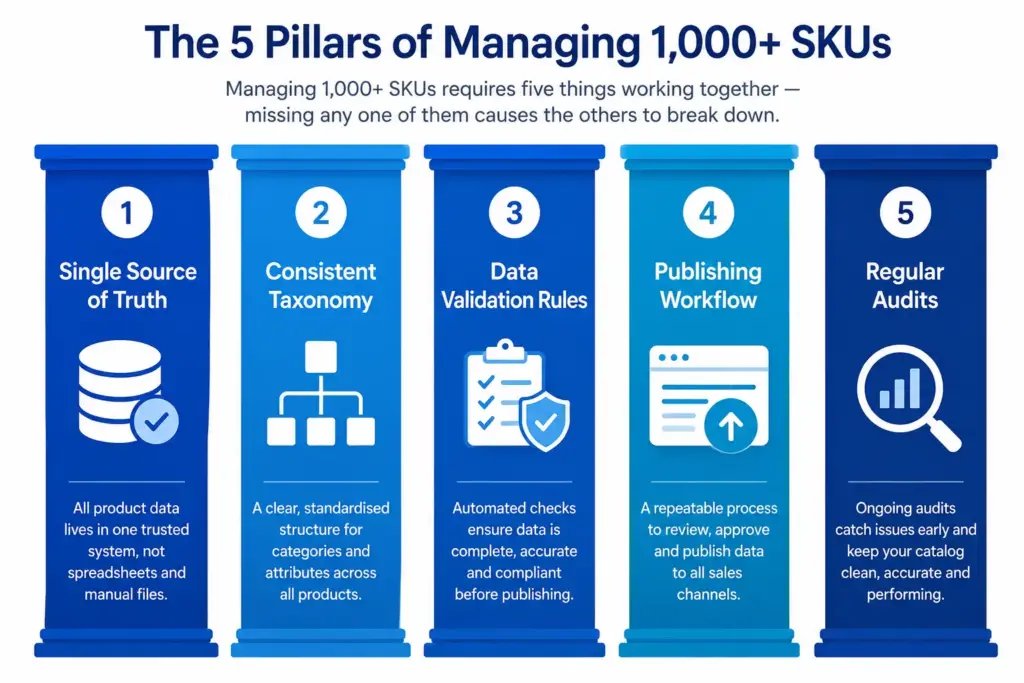
The 5 Systems You Need at 1,000+ SKUs
1. Centralised product data (single source of truth)
One place where all product data lives and is edited. Updates flow from here to all channels — not from channels back to a master spreadsheet. The question “what is the correct title for product X?” has one answer and one place to find it.
2. Enforced taxonomy and categorisation
Every product is in the correct subcategory with the correct attribute set populated. Uncategorised products and miscategorised products both cause the same problem: they are invisible in filters and they underperform in channel feeds. At 1,000+ SKUs you need a system that flags uncategorised products rather than silently letting them accumulate.
3. Data validation rules
Rules that prevent incorrect or incomplete data from being published. Required fields that must be filled before a product can go live. Controlled value lists that prevent “Navy”, “Dark Navy”, and “Midnight Blue” from all being entered as separate colour values. GTIN format validation that catches invalid barcodes before they hit Merchant Center. Without validation rules, data quality degrades with every product addition.
4. A defined publishing workflow
The steps a product goes through from creation to live publication: data entry → image upload → attribute enrichment → review → approval → publish to website → push to channels. A defined workflow prevents incomplete products from going live and creates accountability for each step.
5. Regular catalog audits
Catalog quality degrades over time without active maintenance. Run a completeness audit quarterly, a duplicate SKU check monthly, and a category assignment review whenever catalog structure changes. See Catalog Health Score for the full process.
Practical Tips for Managing Large SKU Counts
- Use bulk operations for catalog-wide changes — updating colour values for 500 products one by one takes days. Bulk find-and-replace operations take minutes. Invest time in building bulk operation capability early.
- Treat new product launches as projects, not tasks — a new product that needs 12 attribute fields, 5 images, and a Google Shopping title before it can go live is a multi-step project, not a single task. Assign it accordingly.
- Separate content creation from data entry — copywriting for product descriptions and data entry for attribute fields are different skills. Don’t require your data entry team to write copy or your copywriters to understand GTIN requirements.
- Archive rather than delete discontinued products — deleted products leave dead links and break order history. Archive discontinued SKUs so they are inactive but still findable if needed.
The Catalog Health Score benchmarks your current catalog quality and flags where the biggest gaps are. The Completeness Checker shows exactly which products are missing which attributes across your full catalog. Start with the LynkPIM free plan to centralise product data and enforce validation rules without an enterprise implementation project.
nNext steps: the ecommerce product taxonomy and category mapping guide ; the PIM Readiness Score .
nnFrequently Asked Questions
At what point does a spreadsheet stop working for SKU management?
Spreadsheets typically become unmanageable around 500 SKUs with a single channel, or sooner with multiple channels or team members. The specific breaking points are: version control failures (two people edit simultaneously), formula errors that corrupt data silently, and the inability to enforce data validation rules. The symptom is usually a data incident — wrong prices going live, or products going live with missing images.
What is the most common problem with large ecommerce catalogs?
Inconsistent attribute values — the same property appearing under different names or with different values across different products. Navy vs Dark Navy vs Midnight Blue for the same colour. S vs Small vs SM for the same size. This accumulates gradually as different team members enter data using different conventions, and it breaks filters, reduces search accuracy, and creates channel feed errors.
Product catalog management series
- Product catalog management: the complete guide : Start here: process, roles, systems, metrics and a 90-day plan.
- What is product catalog management? : A short introduction and definition.
- How to build a product catalog : Structure, taxonomy, SKUs, attributes and images in the right order.
- How to manage 1,000+ SKUs (you are here): The five systems you need as the catalog grows.
- Duplicate SKUs : How to find them and stop them coming back.