How Product Data Quality Affects Your Google Shopping ROAS
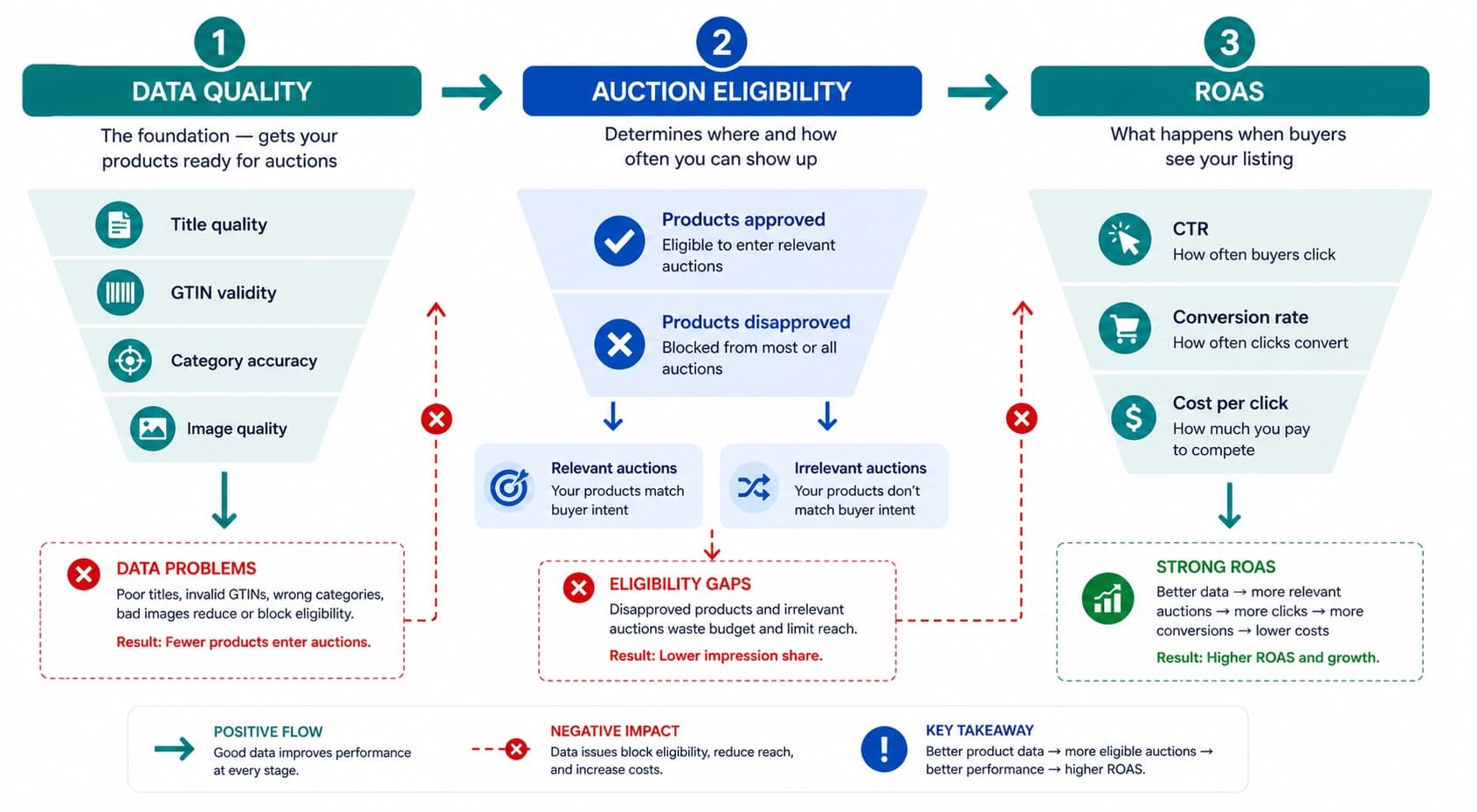
Most Google Shopping ROAS discussions focus on bids, bidding strategies, and campaign structure. These matter. But for stores with data quality problems, no bidding strategy can overcome a feed where products are disapproved, titles are vague, categories are wrong, or GTINs are invalid. Product data quality affects ROAS before a single auction is entered.
This article covers the six data quality factors with the biggest direct ROAS impact, ranked by how much they cost you and how quickly they can be fixed.
How Product Data Affects ROAS — The Mechanism
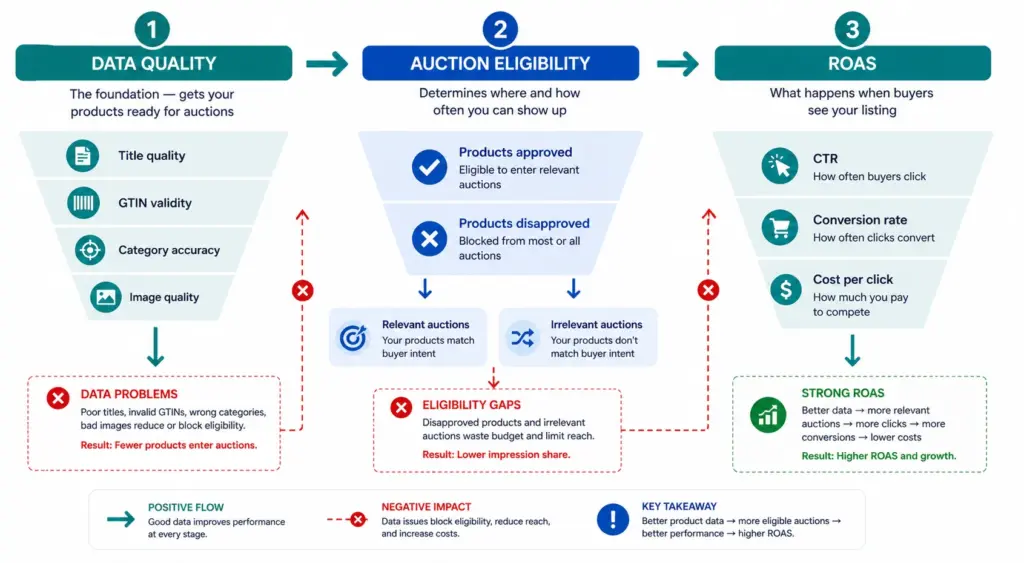
Product data quality affects ROAS through three distinct mechanisms. Understanding which applies to which data problem helps you prioritise fixes correctly.
- Auction eligibility: Disapproved products do not enter any auctions. Products with “Limited performance” warnings enter fewer auctions and at lower positions. GTIN errors and policy violations cause this.
- Auction relevance: Your title and
google_product_categorydetermine which search queries your products are matched to. Vague titles and broad categories match your products to irrelevant queries — you spend budget on traffic that does not convert. - Click-to-conversion rate: Image quality, title specificity, and price competitiveness all affect whether a click becomes a purchase. This is the layer that most data quality guides ignore but where significant ROAS gains are available.
Factor 1: Product Titles — The Highest-Impact Fix
Google uses your product title as the primary signal for matching your product to search queries. A vague title matches fewer queries. A specific, well-structured title matches more relevant queries at higher relevance scores — meaning better positions at lower CPCs.
The ROAS impact of title quality is larger than most stores expect because it affects both sides of the equation: the cost of each click (auction position) and the value of each click (title specificity means higher buyer intent).
| Title Type | Queries Matched | Typical CTR | Typical Conversion Rate |
|---|---|---|---|
| “Men’s Jacket” | Broad, low-intent | 0.8–1.2% | Low — wrong intent mix |
| “Columbia Rain Jacket Men Navy L” | Specific, high-intent | 3.5–5.2% | High — buyer knows what they want |
Title formula: Brand + Gender/Age + Material + Product Type + Colour + Size for apparel. Brand + Key Spec + Product Type + Model for electronics. Check every title against this formula using the Feed Audit Checklist .
Factor 2: GTINs — The Eligibility Gate
Products without valid GTINs receive a “Limited performance” status in Google Merchant Center. This is not a warning you can safely ignore. Limited performance means:
- Reduced auction eligibility — the product enters fewer auctions than it would with a valid GTIN
- Lower relevance scores — Google cannot cross-reference the product against its product knowledge graph
- No eligibility for Shopping promotions or special ad formats that require GTIN verification
For branded products, fixing invalid GTINs directly restores auction eligibility. For custom or handmade products that genuinely have no manufacturer GTIN, set identifier_exists = FALSE — this removes the warning without fabricating a GTIN.
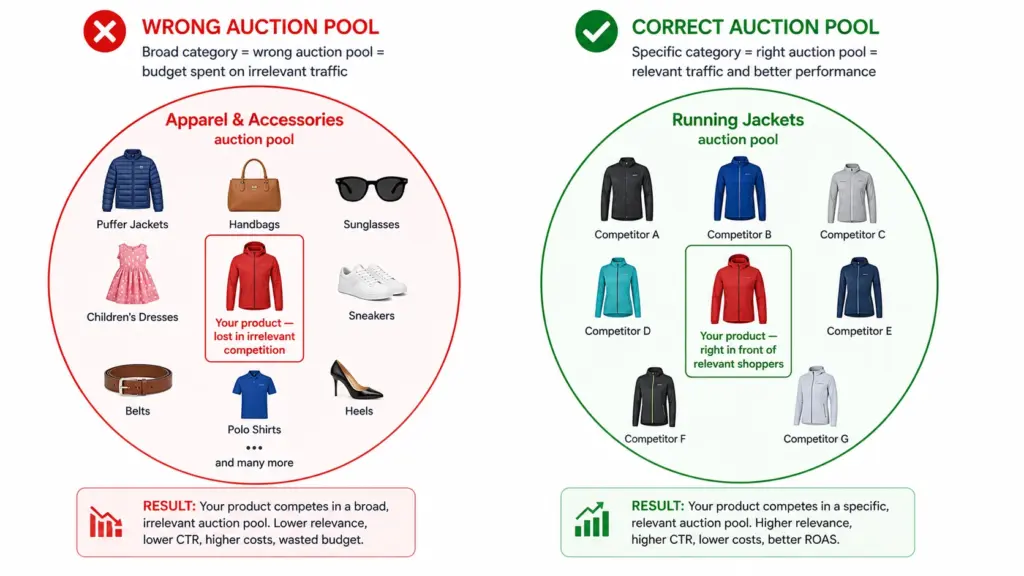
Factor 3: Google Product Category — The Auction Pool Problem
An incorrect or overly broad google_product_category puts your product in the wrong auction pool. A running jacket in “Apparel & Accessories” competes against handbags, sunglasses, and children’s clothing — all irrelevant to your buyer. Your bids are wasted on impressions that will not convert because the query intent does not match.
Fixing category mapping to leaf-node IDs is a one-time task per subcategory. Once mapped correctly in your feed, it applies to all products in that subcategory automatically. Full guide at Google Product Category Taxonomy .
Factor 4: Image Quality — The CTR Multiplier
In Google Shopping, the product image is the first thing a buyer sees. It is the primary visual decision trigger before the title or price are read. Image quality directly affects CTR, and CTR directly affects ROAS.
- White background images consistently outperform lifestyle images for CTR in Shopping results for most product categories
- Higher resolution images (800×800px+) render better in Shopping and reduce the pixelation that signals low-quality product listings
- Multiple images via
additional_image_link(up to 10) improve performance — Google can show different angles in different contexts - Colour-specific images for variants — a buyer filtering for navy gets shown the navy product, not a different colour from the same style
Factor 5: Price and Availability Freshness
A price mismatch disapproval removes a product from Shopping entirely — zero impressions, zero clicks, zero revenue until fixed. For stores that run frequent promotions or have fast-moving stock, stale feed data is a constant ROAS drain because it creates disapprovals that take 24–48 hours to resolve.
The fix is structural: daily minimum feed updates, twice-daily during promotion periods, and using sale_price + sale_price_effective_date for promotions rather than changing the base price field. This prevents price mismatch disapprovals at the source.
Factor 6: Attribute Completeness — The Long Tail Opportunity
Products with complete optional attributes — colour, size, material, pattern, age_group, gender — match against more specific long-tail search queries. A buyer searching “navy size 12 waterproof running jacket women” only finds your product if all five of those attributes are present in your feed.
Long-tail queries typically convert at higher rates than broad queries because they indicate more specific buying intent. Every missing optional attribute is a set of high-intent queries your product is invisible for. Run an attribute completeness audit using the Completeness Checker to identify which products are missing which attributes at scale.
Priority Order — Where to Start
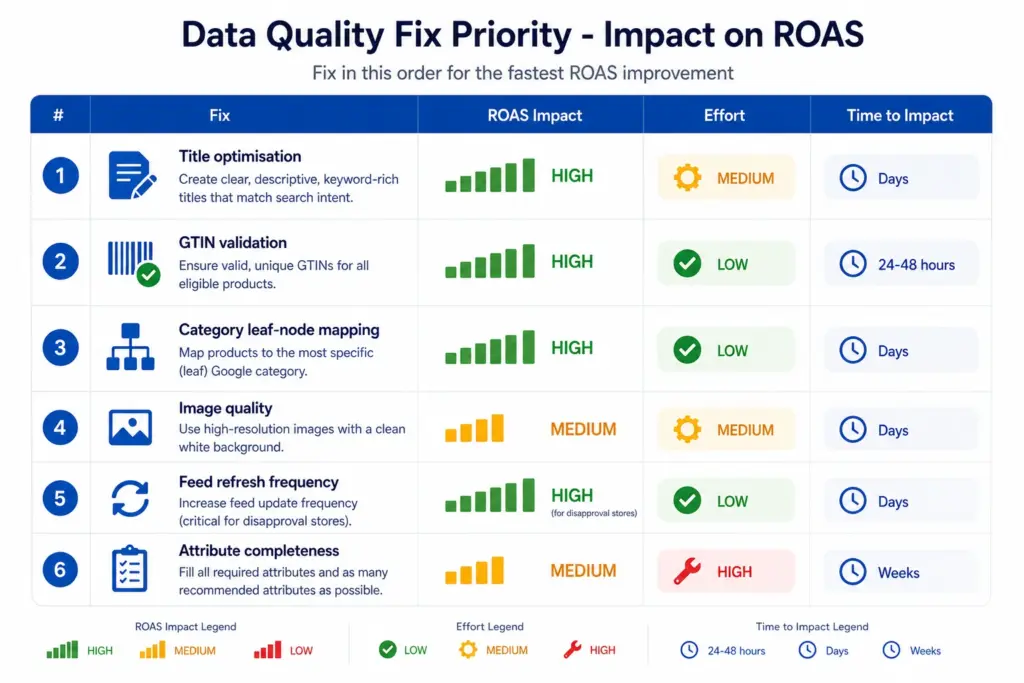
- Fix disapprovals first — any disapproved product is earning zero. Check Merchant Center Diagnostics before anything else. See the Fix Disapprovals guide .
- Optimise titles — highest impact on relevant traffic. Apply the title formula to your top 20% of products by revenue first.
- Validate GTINs — restore “Limited performance” products to full auction eligibility.
- Fix category mapping — move all products from parent categories to leaf nodes.
- Set up daily feed refresh — prevent price mismatch disapprovals from recurring.
- Complete optional attributes — unlock long-tail query matching for all products.
Use the Catalog Health Score to benchmark your current data quality across all six factors and get a prioritised fix list specific to your catalog. For ongoing feed management that prevents these issues at source, explore the LynkPIM free plan .
Frequently Asked Questions
Does product data quality affect Google Shopping ROAS?
Yes, directly — through three mechanisms: auction eligibility (disapproved products don’t appear at all), auction relevance (vague titles and broad categories match wrong queries), and click-to-conversion rate (image quality and title specificity determine whether clicks convert). All three affect ROAS before any bidding decision is made.
Which product data fix has the biggest impact on Google Shopping ROAS?
Title optimisation typically delivers the biggest immediate ROAS improvement for most stores. A specific, well-structured title matches more relevant search queries, improves auction relevance, increases CTR, and attracts higher-intent buyers. Apply the formula: Brand + Gender/Age + Material + Product Type + Colour + Size for apparel; Brand + Key Spec + Product Type for electronics.
How does a missing GTIN affect Google Shopping performance?
Products without valid GTINs receive “Limited performance” status — reduced auction eligibility, fewer impressions, and lower positions than identical products with valid GTINs. For branded products, fixing invalid GTINs directly restores full auction eligibility. For custom products with no manufacturer GTIN, set identifier_exists = FALSE to remove the warning.

By Binu Mathew
CEO @ itmarkerz technologiesBinu Mathew is the CEO of itmarkerz technologies and founder of LynkPIM — a modern product information management platform built for growing e-commerce brands. He has spent years working at the intersection of product data, digital commerce, and catalog operations, helping teams eliminate data silos, enforce quality standards, and publish accurate product content at scale. His work spans PIM strategy, marketplace syndication, and Digital Product Passport compliance.
Use These PIM Tools Next
- Use the PIM Readiness Assessment to Benchmark Your Team
- Check Catalog Health Score Before Expanding Channels
- Audit Required Product Fields with the Completeness Checker
- Validate GTIN, UPC, and EAN Codes Before Publishing
- Assess Team Capability Gaps Before Process Changes
- Evaluate Data Governance Maturity for Scaled Catalog Operations
Build Your Product Data Roadmap
Move from theory to execution with free tools and a practical PIM implementation path.