Google Product Category vs Your Internal Taxonomy: What’s the Difference?
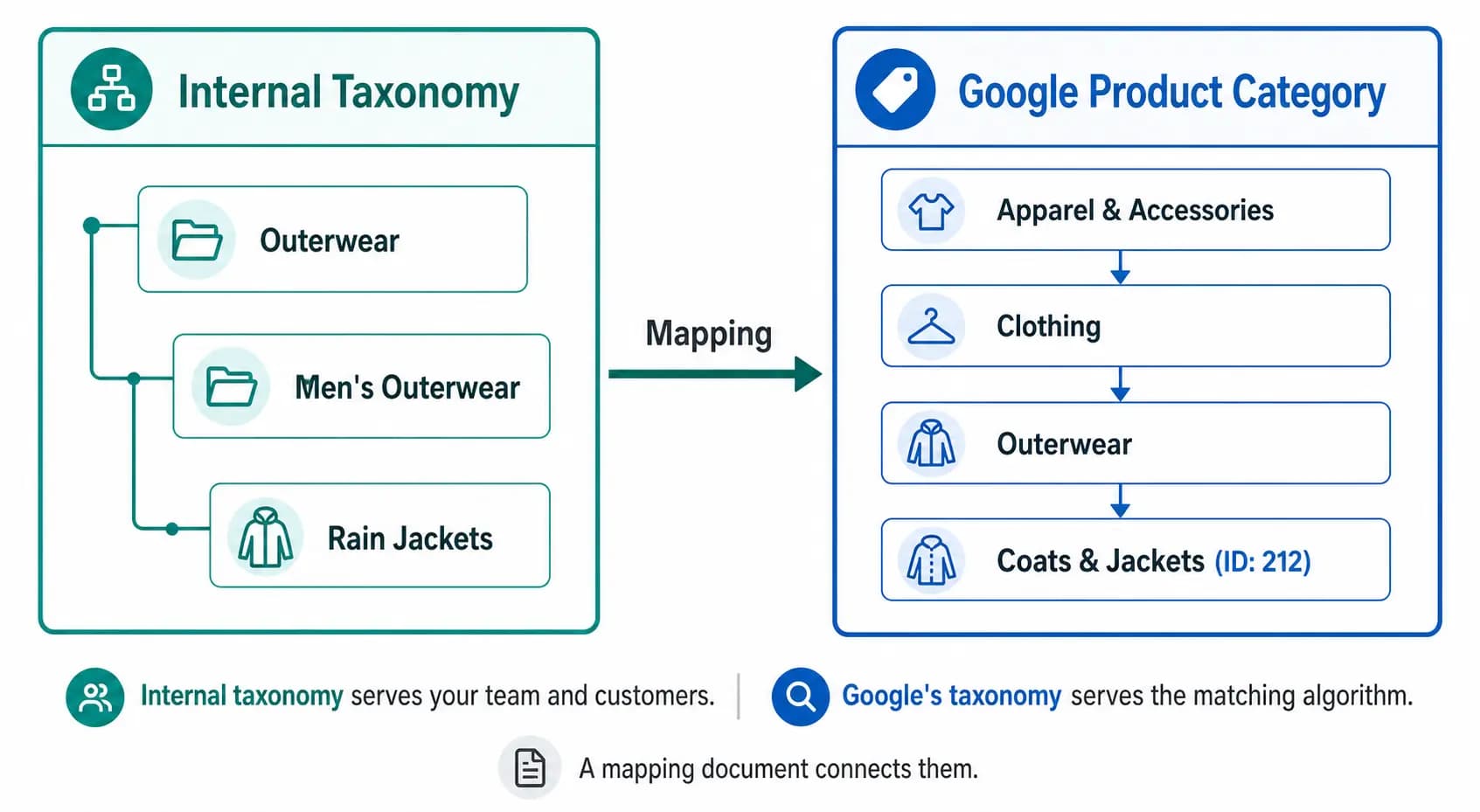
Two taxonomies. One product. This is the reality of modern ecommerce — every product needs to live somewhere in your internal catalog structure, and simultaneously needs to be classified in Google’s own taxonomy for Shopping performance. These two systems serve completely different purposes and should never be confused for each other.
Your Internal Taxonomy — What It’s For
Your internal product taxonomy is the classification system you design for your own business. It reflects how your team organises products, how your customers browse your site, and how your buying and merchandising teams think about the catalog.
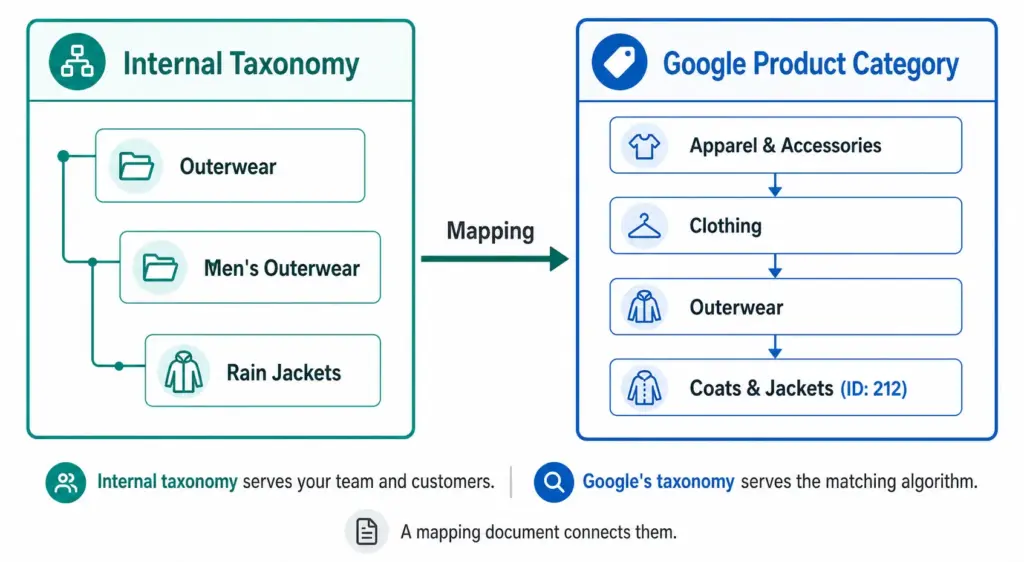
It uses your naming conventions. “Outerwear” might be at Level 2 in your taxonomy. “Men’s Rain Jackets” might be your Level 3 subcategory. These names work for your team because they reflect how you buy, stock, and sell these products.
Your internal taxonomy also drives your site navigation, search filters, and internal reporting. It is designed for humans — your buyers, your customers, and your ecommerce team. For a full guide on building it correctly, see What Is Product Taxonomy and How to Build a Product Taxonomy From Scratch .
Google’s Product Category Taxonomy — What It’s For
Google’s product category taxonomy is a fixed, hierarchical classification system that Google uses to understand what your product is. It has over 6,000 categories across up to 7 levels, maintained by Google and updated periodically.
It is designed for Google’s matching algorithm — not for humans. When you assign a product to “Apparel & Accessories > Clothing > Outerwear > Coats & Jackets” (ID: 212), you are telling Google’s algorithm which auction pool this product belongs in, which additional attribute requirements apply, and how to match it to buyer search queries.
You do not modify it. You map your products to it. The full taxonomy ID list is available publicly and should be used as a reference, not a foundation for your own catalog structure. Full details in the Google Product Category Taxonomy guide .
The Key Differences
| Internal Taxonomy | Google Product Category | |
|---|---|---|
| Who designs it | You | |
| Who it serves | Your team and customers | Google’s matching algorithm |
| Naming convention | Your own naming | Google’s fixed naming |
| How deep | 3–4 levels typical | Up to 7 levels, 6,000+ nodes |
| Where it lives | Your PIM / platform / spreadsheet | The google_product_category feed field |
| What it powers | Navigation, filters, internal ops, reporting | Shopping auction relevance, attribute requirements, tax rules |
| How often it changes | When your catalog evolves | 1–2 times per year by Google |
| Can you modify it | Yes — it’s yours | No — you only map to it |
Why You Need Both — and Why They’re Different
A common mistake is trying to build an internal taxonomy that mirrors Google’s. This creates several problems:
- Google’s naming doesn’t match customer language — “Coats & Jackets” is fine for an algorithm but might not reflect how your buyers describe products on your site
- Google’s structure doesn’t match your business — your business may organise products by season, by brand, by collection, or by customer segment in ways that don’t correspond to Google’s classification
- Google updates break your internal structure — if your navigation and filters are built on Google’s taxonomy, every Google taxonomy update requires changes to your site
Your internal taxonomy should be built for your customers and your team. Google’s taxonomy should be mapped to from your internal taxonomy — a separate, maintained mapping document that connects your subcategories to the correct Google category IDs.
How to Build the Mapping Document
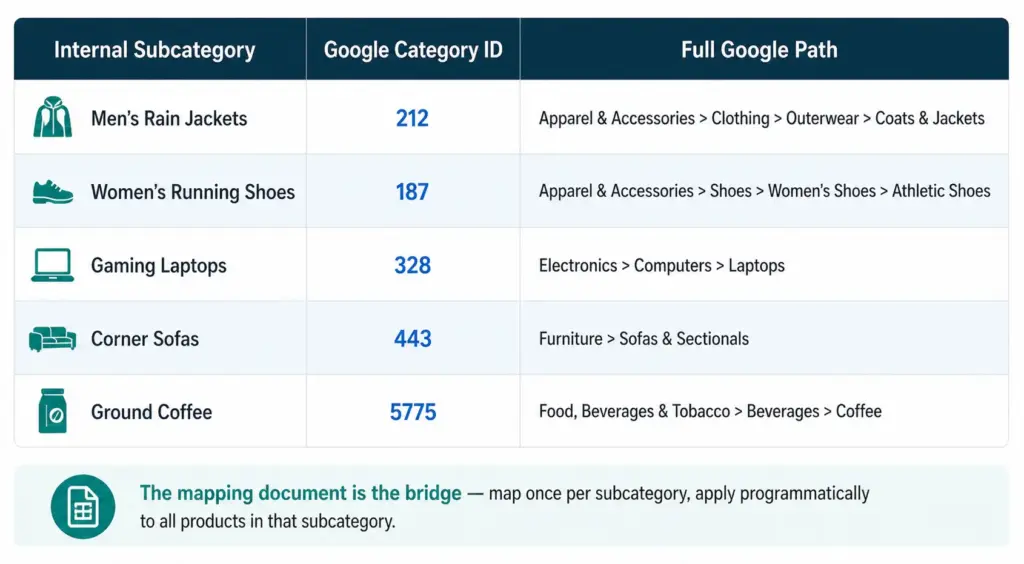
The mapping document is a simple table: your internal subcategory name on the left, the corresponding Google category ID on the right. This is the only connection you need between your taxonomy and Google’s.
- List every subcategory in your internal taxonomy
- For each subcategory, search Google’s taxonomy file for the most specific matching leaf node
- Record the numeric ID — not the text path string
- Apply the ID to all products in that subcategory programmatically — not product by product
- Review annually when Google publishes taxonomy updates
This approach means a taxonomy change on Google’s side only requires updating the mapping document, not restructuring your internal taxonomy, your site navigation, or your product records.
The product_type Field — the Third Layer
Google Shopping feeds support a third category-related field: product_type. Unlike google_product_category, this is a free-form field you control completely.
Use product_type to include your internal taxonomy path in the feed — for example, “Outerwear > Men’s Outerwear > Rain Jackets”. This value does not affect Google’s matching algorithm but it does appear as a segmentation option in Google Ads, letting you create Shopping campaigns and bid strategies based on your own category structure rather than Google’s.
This means you can have all three in your feed simultaneously:
google_product_category: 212 (tells Google what the product is)product_type: Outerwear > Men’s Outerwear > Rain Jackets (your internal naming for campaign segmentation)- Internal taxonomy: stored in your PIM, driving your site and your team’s workflow
Check the Flat vs Hierarchical Taxonomy guide to ensure your internal structure is appropriately deep before building your mapping document. Take the PIM Readiness Score to see how well your current product data governance supports this dual-taxonomy approach.
Frequently Asked Questions
Do I need both an internal taxonomy and Google product categories?
Yes. Your internal taxonomy serves your team and customers using your naming conventions. Google’s taxonomy serves their matching algorithm using their naming conventions. You need both, connected by a mapping document that translates your subcategory names to Google category IDs.
Should I build my internal taxonomy to match Google’s?
No. Build your internal taxonomy for how your team and customers think about your products. Keep the mapping to Google’s taxonomy in a separate document. If you build your internal structure to mirror Google’s, you tie your site navigation and team workflows to a taxonomy you don’t control — and every Google update risks breaking something in your catalog.
What is the product_type field and how does it relate to my internal taxonomy?
The product_type field is a free-form field in your Google Shopping feed where you include your own internal category path. It does not affect Google matching but enables campaign segmentation in Google Ads based on your own taxonomy naming. It is the bridge between your internal taxonomy and your Google Shopping campaigns.
How often does Google’s taxonomy change and how does that affect my internal taxonomy?
Google updates its taxonomy 1–2 times per year. These changes do not affect your internal taxonomy at all — they only affect the mapping document. Using numeric IDs in your feed (not text path strings) means most updates have zero impact on your feed, since IDs remain valid even when Google renames a category path.

By Binu Mathew
CEO @ itmarkerz technologiesBinu Mathew is the CEO of itmarkerz technologies and founder of LynkPIM — a modern product information management platform built for growing e-commerce brands. He has spent years working at the intersection of product data, digital commerce, and catalog operations, helping teams eliminate data silos, enforce quality standards, and publish accurate product content at scale. His work spans PIM strategy, marketplace syndication, and Digital Product Passport compliance.
Use These PIM Tools Next
- Use the PIM Readiness Assessment to Benchmark Your Team
- Check Catalog Health Score Before Expanding Channels
- Audit Required Product Fields with the Completeness Checker
- Validate GTIN, UPC, and EAN Codes Before Publishing
- Assess Team Capability Gaps Before Process Changes
- Evaluate Data Governance Maturity for Scaled Catalog Operations
Build Your Product Data Roadmap
Move from theory to execution with free tools and a practical PIM implementation path.